

Author: @atilayberber
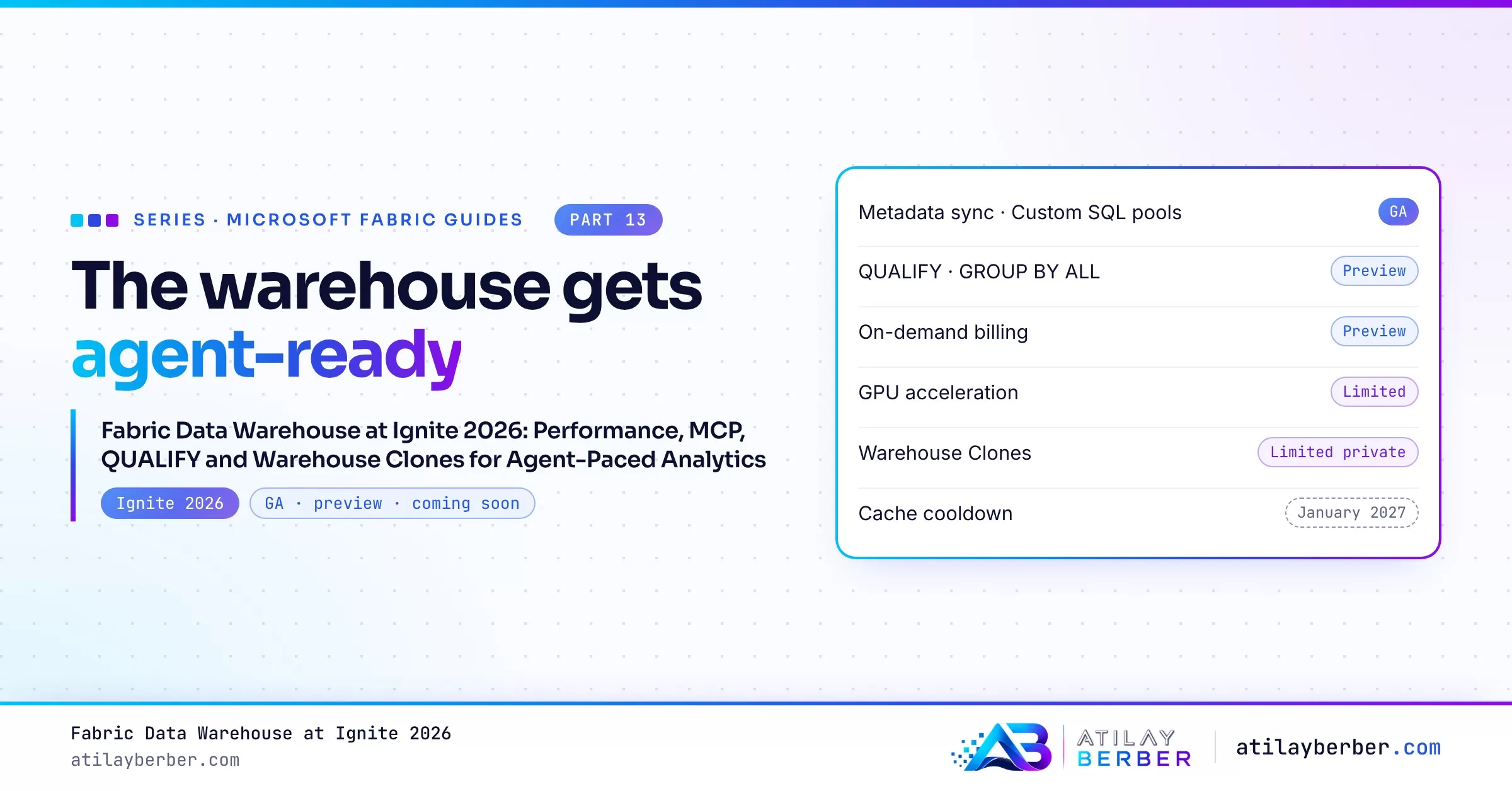
During Ignite 2026, Microsoft published a dedicated post for Fabric Data Warehouse, and it opens with an interesting claim: according to their telemetry, agentic analytics has arrived. AI agents run a query, look at the result, drill down with another one, test, iterate, and they don’t wait for a human in between. Engines designed for human-paced work start to struggle under that machine-paced traffic.
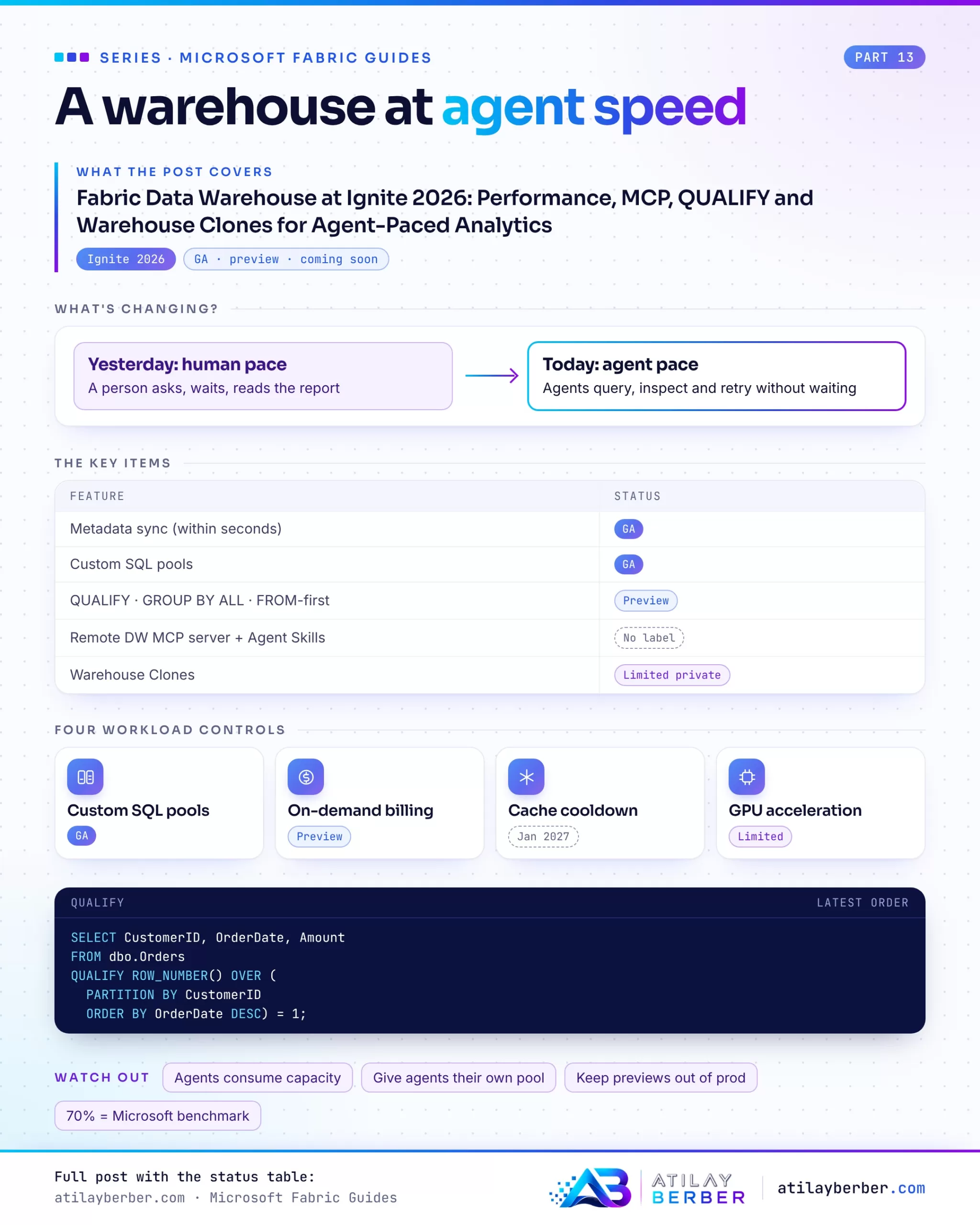
Everything in the announcement hangs off that idea: performance so agents don’t stall, MCP and Agent Skills so agents can reach the warehouse safely, and richer T-SQL, monitoring and lifecycle tooling for the people who build and run it.
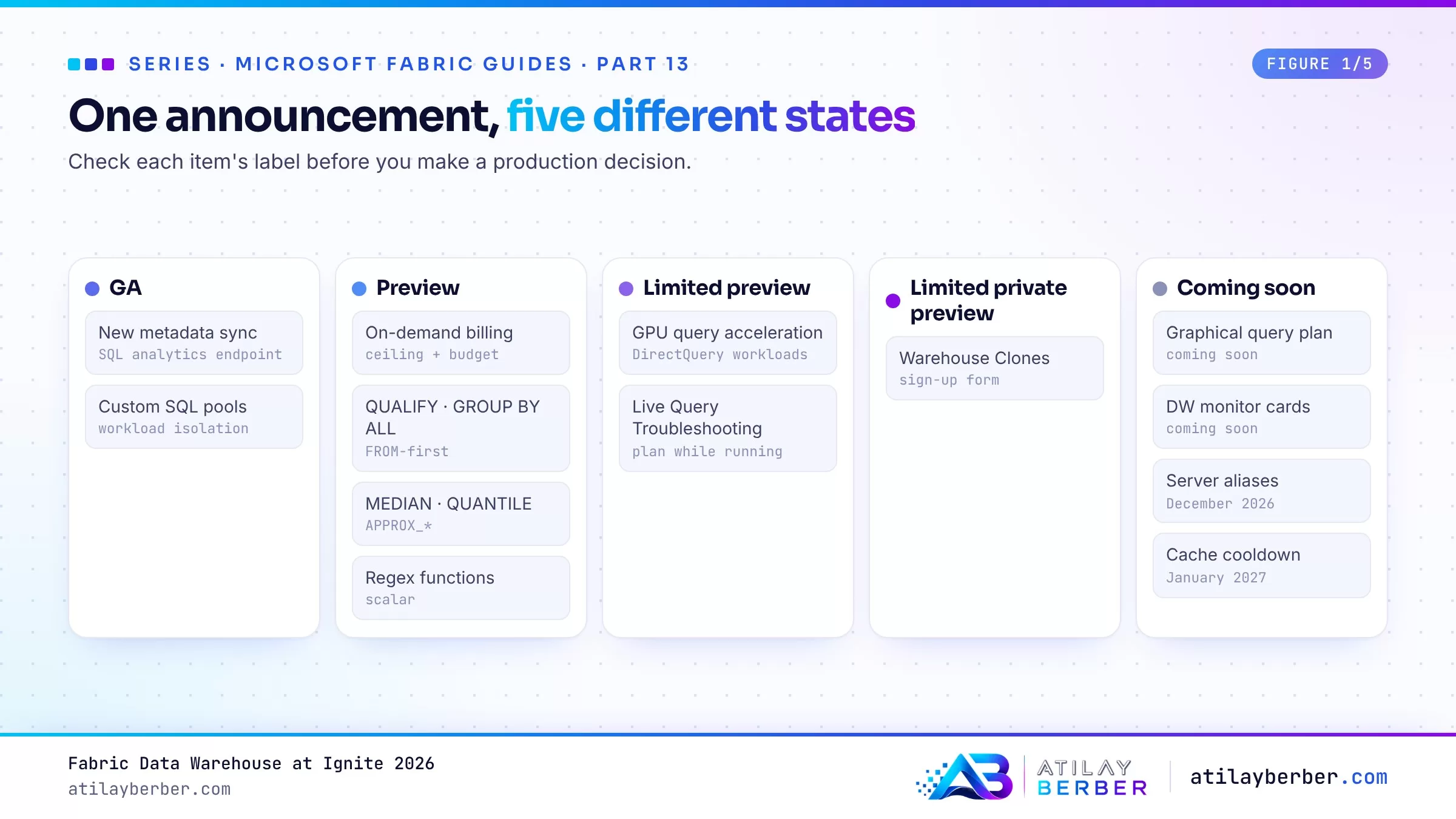
In this post I go through each item with its release status. The announcement mixes GA, preview, limited preview, limited private preview and “coming soon” in the same list, and when you’re deciding what to put in production, that distinction matters more than anything else. The post is part of the Microsoft Fabric Guides series on this site.
At a glance: Fabric Data Warehouse at Ignite 2026
| Feature | Area | Status |
|---|---|---|
| New metadata sync for the SQL analytics endpoint | Performance | GA |
| Rebuilt distributed shuffle and task scheduling | Performance | Rolled out |
| Custom SQL pools | Workload controls | GA |
| On-demand billing | Workload controls | Preview |
| Cache cooldown | Workload controls | January 2027 |
| GPU-based query acceleration | Workload controls | Limited preview |
| Remote Data Warehouse MCP server and Agent Skills | Agent access | No status label in the post |
| Fabric IQ ontologies with data agents | Agent access | No status label in the post |
| Graphical query plan | Monitoring | Coming soon |
| Live Query Troubleshooting | Monitoring | Limited preview |
| DW monitor diagnostic cards | Monitoring | Coming soon |
| FROM-first, GROUP BY ALL, QUALIFY | T-SQL | Preview (T-SQL language enhancements) |
| MEDIAN, QUANTILE, APPROX_MEDIAN, APPROX_QUANTILE | T-SQL | Preview (T-SQL language enhancements) |
| Regular expression functions | T-SQL | Preview |
| UDFs with control flow, calling User Data Functions | T-SQL | No status label in the post |
| VARCHAR(MAX) / VARBINARY(MAX) on the SQL analytics endpoint | Data types | No status label in the post |
| Warehouse Clones | Development | Limited private preview (sign-up) |
| CI/CD 2.0 (DacFx) | Development | No status label in the post |
| Workspace server aliases | Connectivity | December 2026 |
| Migration Assistant: incremental migration, Teradata | Migration | No status label in the post |
Where the table says “no status label in the post”, Microsoft’s Ignite post doesn’t state GA or preview explicitly. Check the current label on the matching Microsoft Learn page before you rely on those items in production.
1. Performance: don’t make the agents wait
One line in the post sums up this whole section: “When queries wait, agentic investigations pause.” Microsoft tackles performance on three fronts.
New metadata sync (GA)
The lag between writing data to a lakehouse and seeing it in the SQL analytics endpoint has been one of Fabric’s oldest complaints. The new metadata sync is now GA. According to the Ignite post, this release brings:
- A straightforward upgrade path for existing SQL analytics endpoints.
- Metadata refreshes within seconds and at query time, so queries always see the latest data.
- Support for large object (LOB) types and time travel.
- Compatibility with Delta checkpoint V2.
I covered the upgrade steps (GetStatus, Preflight and Upgrade APIs, plus the monitoring DMV) in my Fabric November 2026 Update post, so I won’t repeat them here.
A faster engine
Microsoft says it recently rolled out two engine changes: a rebuilt distributed shuffle that speeds up data movement between query nodes, and enhanced task scheduling for better resource use. Combined with earlier work such as distributed bitmap filters and usage-based resource estimation corrections, Microsoft says Fabric Data Warehouse performance has improved by 70% on an industry-standard benchmark over the past year.
That’s Microsoft’s own number, and the benchmark itself is tucked away in a footnote. How much of it you’ll feel depends on your query patterns. There’s nothing to switch on; it just arrives. Still, comparing your own query durations in Query Insights before and after is a good habit.
Workload controls: performance or cost?
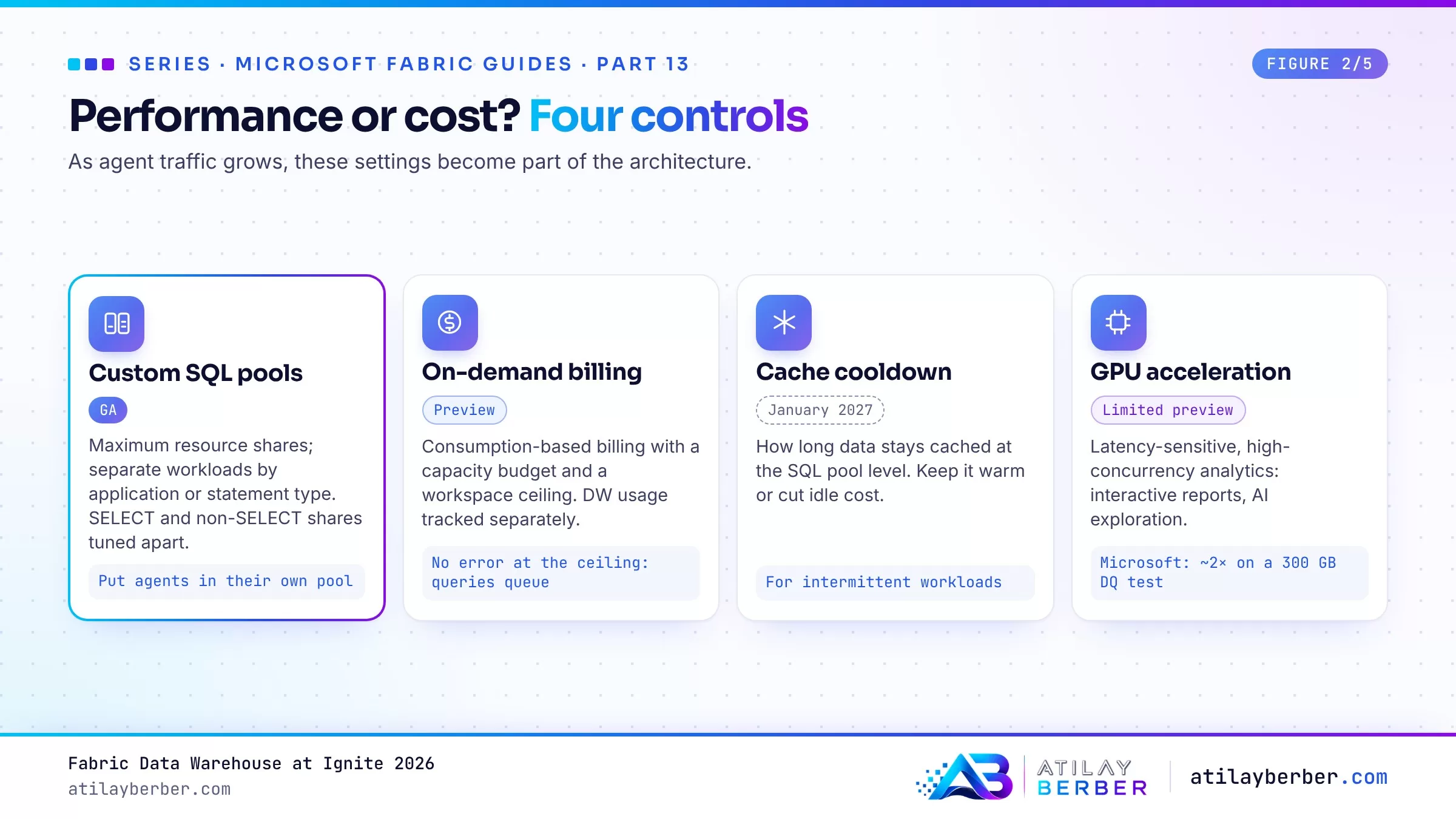
For me this is the most practical part of the announcement. There are four controls, and each one has a different status:
- Custom SQL pools (GA): Set maximum resource shares and separate workloads by application or statement type. You tune SELECT and non-SELECT (write) allocations to match your read/write mix. I explained the vNode consumption and isolation model in SQL Pools in Fabric Data Warehouse. A small correction: in my September 2026 update post I listed Custom SQL pools as GA while Learn still showed preview at the time. With Ignite, GA is now official.
- On-demand billing (preview): Consumption-based billing with capacity-level budget controls and workspace-level ceilings. Data Warehouse consumption is kept separate from other workload categories. When a workspace hits its ceiling, queries queue and resume as resources free up. So the ceiling isn’t an error, it’s a wait.
- Cache cooldown (January 2027): Will let you control how long data stays cached at the SQL pool level. Keep data warm between bursts of activity, or shorten retention to cut idle allocation and cost.
- GPU-based query acceleration (limited preview): Aimed at high-concurrency, latency-sensitive analytics such as interactive reporting and AI-driven exploration. Microsoft says it delivers roughly twice the performance at one-third lower cost than competing offerings on a 300 GB DirectQuery benchmark. Again, a vendor claim, and since it’s in limited preview, not everyone can use it.
My take: think about on-demand billing and the workspace ceiling together. If an agent fires hundreds of exploratory queries overnight, the ceiling keeps the bill in check. But if your morning reports run in the same workspace, they end up in the same queue. That’s exactly why moving agent traffic to its own workspace or its own Custom SQL pool makes sense.
2. Connecting agents to the warehouse
Remote Data Warehouse MCP server and Agent Skills
According to the post, the remote Data Warehouse MCP server gives agents secure, high-quality access to your warehouses, and Agent Skills for Microsoft Fabric provide specialized guidance for developing, querying and operating Fabric items. Together they bring warehouse-specific capabilities into the AI tools developers already use: exploring schemas, writing SQL, troubleshooting queries and managing warehouse workloads.
A simple way to think about it: the MCP server is the agent’s hands (it can connect and do the work), and Agent Skills are its know-how (how to do that work properly in Fabric).
Business context with Fabric IQ
The Fabric IQ integration uses ontologies to connect warehouse data to shared business models, concepts and relationships. That lets Fabric data agents give natural-language answers grounded in governed enterprise data, and those agents can be published to Teams, Microsoft 365 Copilot, Copilot Studio or custom endpoints. I discussed when you actually need an ontology in Is Your Semantic Model Enough?, and walked through building a data agent in Fabric Data Agents: Building an Agent That Talks to Your Data in Teams.
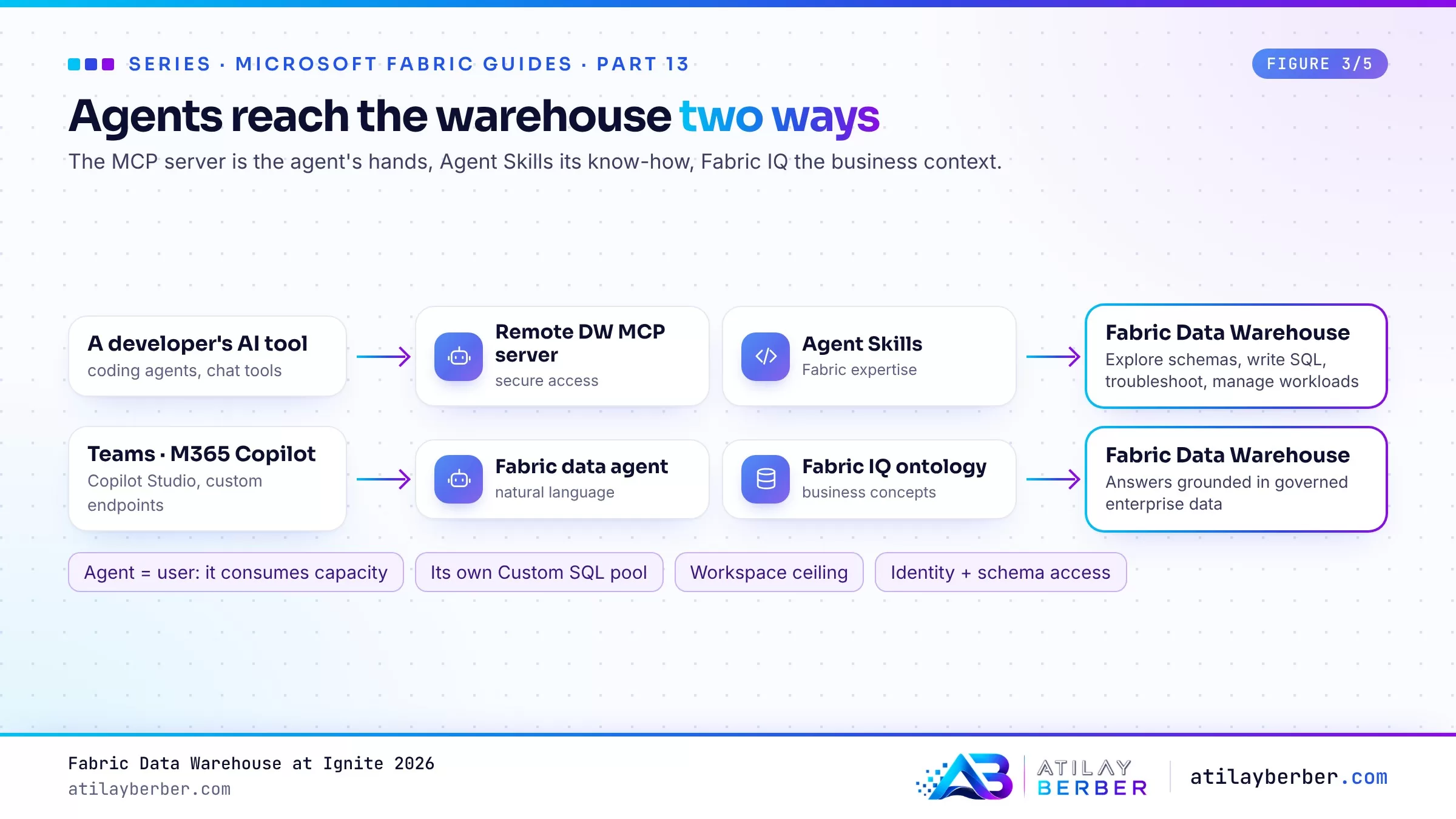
My take: an agent connected over MCP runs queries and consumes capacity just like a user does. Before you connect one, decide which identity it uses, which schemas it can see and which SQL pool it runs in. The workload controls above exist for precisely this scenario.
3. Monitoring and troubleshooting
- Workspace monitoring integration: Warehouses join the shared workspace monitoring view, and workspace-level signals link to individual queries. I covered the basics in Monitoring Fabric Projects with Workspace Monitoring.
- Graphical query plan (coming soon) and Live Query Troubleshooting (limited preview): Show the plan before execution and the activity during execution. The most direct way to spot expensive operators and data movement.
- SQL pool insights enhancements: Near-real-time vNode usage metrics, so compute usage and pool pressure are easier to read.
- DW monitor enhancements (coming soon): Diagnostic cards that surface key workload signals and point you to the next troubleshooting step.
- Operations agent skills: Skills that investigate capacity spikes, recommend SQL pools, assess table health and analyze failures.
4. T-SQL: less repetition, more readable queries
This is my favorite section, because it changes queries we write every day. The T-SQL surface area page on Microsoft Learn says both Warehouse and the SQL analytics endpoint support SELECT-first and FROM-first syntax, GROUP BY ALL and ORDER BY ALL, and QUALIFY. These language enhancements were announced on the Fabric blog as “T-SQL language enhancements in Microsoft Fabric Data Warehouse (Preview)”, so they’re in preview.
QUALIFY: filter on a window function without a subquery
Questions like “each customer’s latest order” have always needed a subquery or a CTE, because you can’t use the result of ROW_NUMBER() in WHERE:
-- Before: CTE + WHERE
WITH s AS (
    SELECT CustomerID, OrderDate, Amount,
           ROW_NUMBER() OVER (PARTITION BY CustomerID ORDER BY OrderDate DESC) AS rn
    FROM dbo.Orders
)
SELECT CustomerID, OrderDate, Amount
FROM s
WHERE rn = 1;
QUALIFY is a filter that runs after window functions are evaluated, so the same query collapses into one level:
-- Now: QUALIFY
SELECT CustomerID, OrderDate, Amount
FROM dbo.Orders
QUALIFY ROW_NUMBER() OVER (PARTITION BY CustomerID ORDER BY OrderDate DESC) = 1;
I explained how window functions work in SQL Server Window Functions; QUALIFY shortens every “keep the latest row” pattern from that post.
GROUP BY ALL: stop repeating the column list
GROUP BY ALL groups by every non-aggregated column in the SELECT list. No more writing the column list twice and forgetting to update one of them:
SELECT Region, Category, YEAR(OrderDate) AS OrderYear, SUM(Amount) AS Revenue
FROM dbo.Sales
GROUP BY ALL
ORDER BY ALL;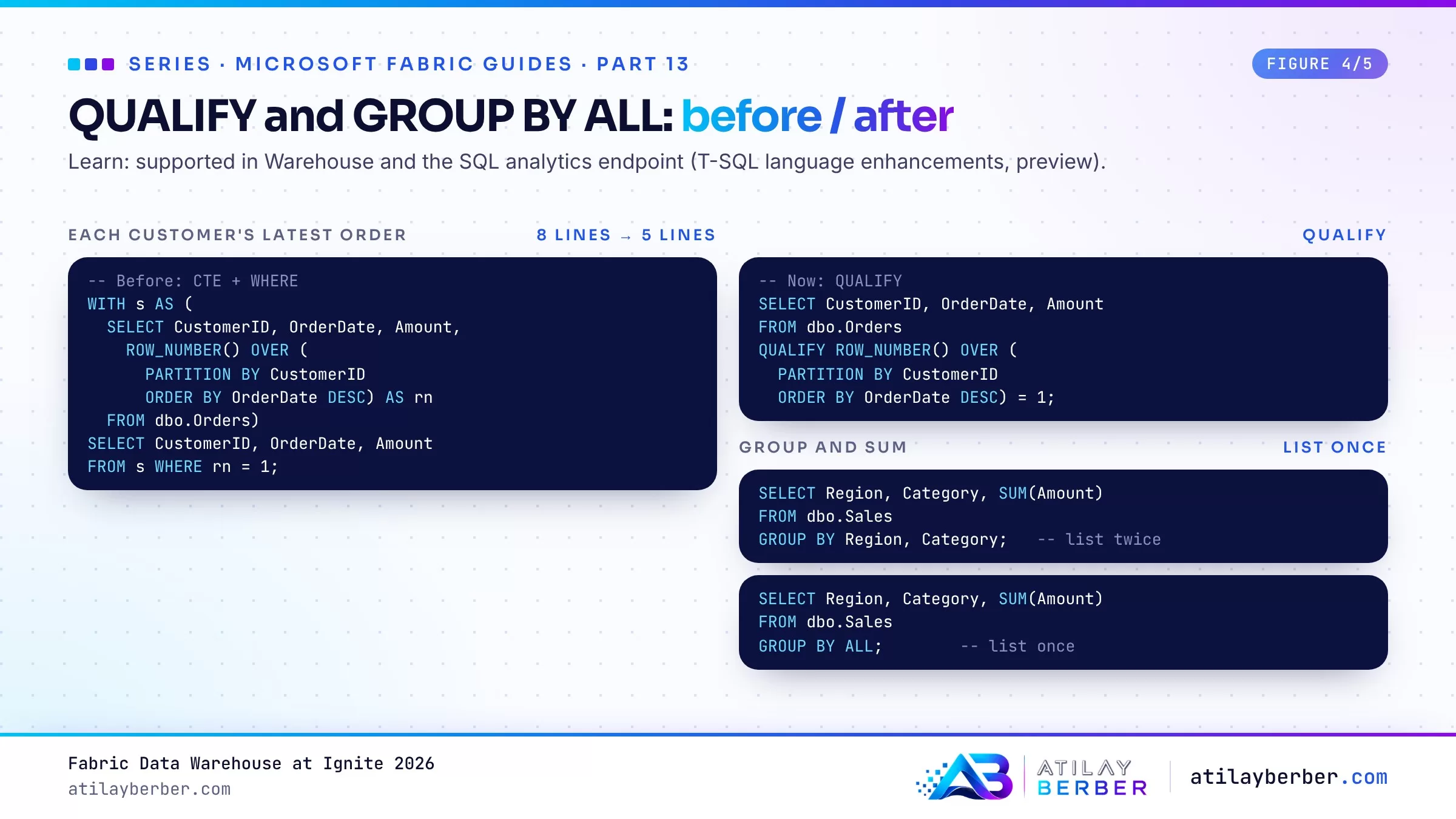
FROM-first
FROM-first syntax lets a query start with FROM. Reading order then matches the order data flows through the query, which helps with long, join-heavy queries and with autocomplete in AI tools (once the table is written first, the tool knows the columns). Both the Ignite post and Learn say the syntax is supported, but Learn doesn’t include an example yet, so I’m not going to guess one here. Check the SELECT page on Learn before you try it.
Regex and analytical aggregates
- Regex:
REGEXP_LIKE,REGEXP_REPLACEandREGEXP_SUBSTRfor matching, replacing and extracting patterns. According to Learn, the regex scalar functions are in preview in Fabric Data Warehouse, and the table-valued regex functions (REGEXP_MATCHES,REGEXP_SPLIT_TO_TABLE) aren’t available in Fabric. I covered how the functions work on the SQL Server 2025 side in RegEx Comes to T-SQL. - Distribution analysis:
MEDIANandQUANTILEfor exact results,APPROX_MEDIANandAPPROX_QUANTILEfor approximate ones. On large tables the approximate versions are much cheaper, with an acceptable error margin. I debated the “can you live with the error?” question on the Power BI side in my APPROXIMATEDISTINCTCOUNT post, and the same reasoning applies here.
UDFs, User Data Functions and new types
- UDFs with control flow: User-defined functions can now include branches, loops,
BREAKandCONTINUE. Eligible functions are inlined into the query, with creation-time checks, actionable errors, resource estimation for control flow and visibility in the plan. - Fabric User Data Functions integration: T-SQL can call published Python functions, which opens a path to APIs, files, configuration and other Fabric data from inside T-SQL.
- Richer data types:
VARCHAR(MAX)andVARBINARY(MAX)come to the SQL analytics endpoint, for text, JSON, logs and binary content. - SQL web experience: Table overviews, a no-code table designer, interactive result visualizations, a redesigned Object Explorer and results grid, and better IntelliSense.
My take: calling User Data Functions from T-SQL is powerful but needs care. A query that calls a Python function per row can get slow and expensive. The announcement doesn’t mention performance or limits, so I’d test it on small data and read the limits on Learn before pointing it at wide tables.
5. Development, deployment and governance
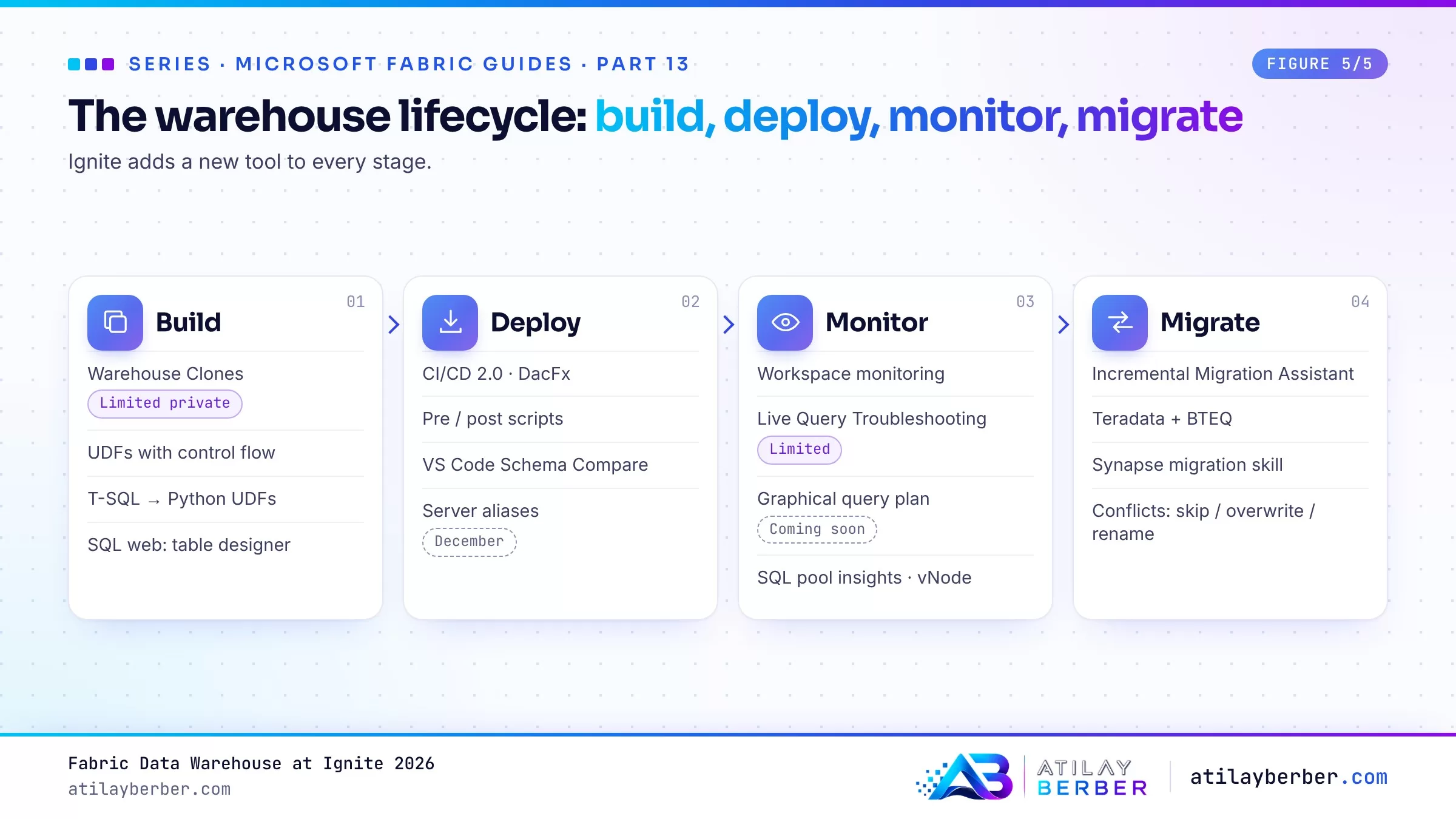
Warehouse Clones (limited private preview)
One of the headline items. Warehouse Clones create point-in-time read/write environments, within a workspace or across workspaces and capacities, without an initial full copy. Use them to separate development, testing, reporting and recovery. You can refresh a clone to a newer restore point while keeping its item and endpoint.
Don’t confuse this with the table clones that exist today: a table clone is a zero-copy clone of a single table, while Warehouse Clones give you a working copy of the whole warehouse. It’s in limited private preview, so you need to sign up through Microsoft’s form to use it.
CI/CD 2.0 (DacFx)
Schema-aware deployment and item-definition lifecycle automation for Warehouse and SQL analytics endpoint workflows. You get pre- and post-deployment scripts for preparation and validation, and Schema Compare in VS Code to review object differences before you deploy. If you come from SQL Server, it’s a familiar model: DacFx and SQL Database Projects.
Connectivity and security
- A more direct client-to-compute path for Private Link workspaces.
- OneLake group registration and column-permission propagation.
- SQL analytics endpoint user mapping.
- Predicate filtering in audit logs.
- Workspace identity for ingestion.
- Workspace server aliases (December 2026): Customer-defined endpoint names to manage connections and recovery for workspaces that use private link.
6. Migration tools
- Incremental migration in Migration Assistant: Move selected objects into an existing destination in waves, resolving conflicts with skip, overwrite or rename.
- Teradata support: Converts uploaded tables, views, functions, macros and stored procedures, and brings BTEQ scripts into stored-procedure workflows.
- Synapse dedicated SQL pool migration skill: Agent-assisted guidance for moving existing warehouse code to Fabric.
My take
It’s easy to read this as a feature list, but I think the real message is this: Microsoft assumes the warehouse’s main user will soon be an agent rather than a person, and it’s tuning the product for that. Metadata that refreshes in seconds, queries that queue at a ceiling instead of failing, access over MCP and operations agent skills all come from the same design idea.
That has two practical consequences. First, cost control is now an architecture decision: connecting agents to a warehouse without separate pools and ceilings is asking for a surprise bill. Second, reading status labels has never mattered more: this announcement has five different states between GA and “coming soon”, and two of the most exciting items (Warehouse Clones and GPU acceleration) aren’t broadly available.
The quick wins are the quiet ones: QUALIFY and GROUP BY ALL, and metadata sync and Custom SQL pools going GA.
What to do this month
- Metadata sync: Plan the upgrade for your existing SQL analytics endpoints; run Preflight on a test endpoint first.
- Agent traffic: If you’re connecting an agent (MCP, data agent, Copilot) to a warehouse, give it its own Custom SQL pool or its own workspace; if you try on-demand billing, set the workspace ceiling up front.
- T-SQL: Rewrite a few of your “latest row” and “group and sum” queries with QUALIFY and GROUP BY ALL in a test warehouse; since they’re in preview, don’t move them into production views yet.
- Warehouse Clones: If you’re struggling to copy warehouses for dev/test, sign up for the limited private preview.
- CI/CD: If you still deploy warehouse schema by hand, it’s time to set up a SQL Database Project with DacFx and VS Code Schema Compare.
- Migration: If you have a Synapse dedicated SQL pool or Teradata estate, plan a small first wave with Migration Assistant’s incremental option.
Sources
- Fabric Data Warehouse at Ignite: Built for AI-era analytics — Fabric Updates Blog (Ignite 2026)
- Fabric November 2026 Feature Summary — Fabric Updates Blog
- T-SQL surface area in Fabric Data Warehouse — Microsoft Learn
- T-SQL language enhancements in Microsoft Fabric Data Warehouse (Preview) — Fabric Updates Blog
- Clone table in Microsoft Fabric — Microsoft Learn
Have you connected an agent to your warehouse yet, or are you planning to? What worries you most: cost, accuracy or security? Tell me on LinkedIn, I’m curious.