

Author: @atilayberber
In Fabric, “table” usually means Delta Lake. Lakehouses, warehouses, pipelines and Eventstream write Delta by default, and Spark, the SQL analytics endpoint and Power BI Direct Lake all read that same Delta copy. OneLake has been exposing those tables to Iceberg readers for a while, but the traffic only went one way: outside engines could read, not write.
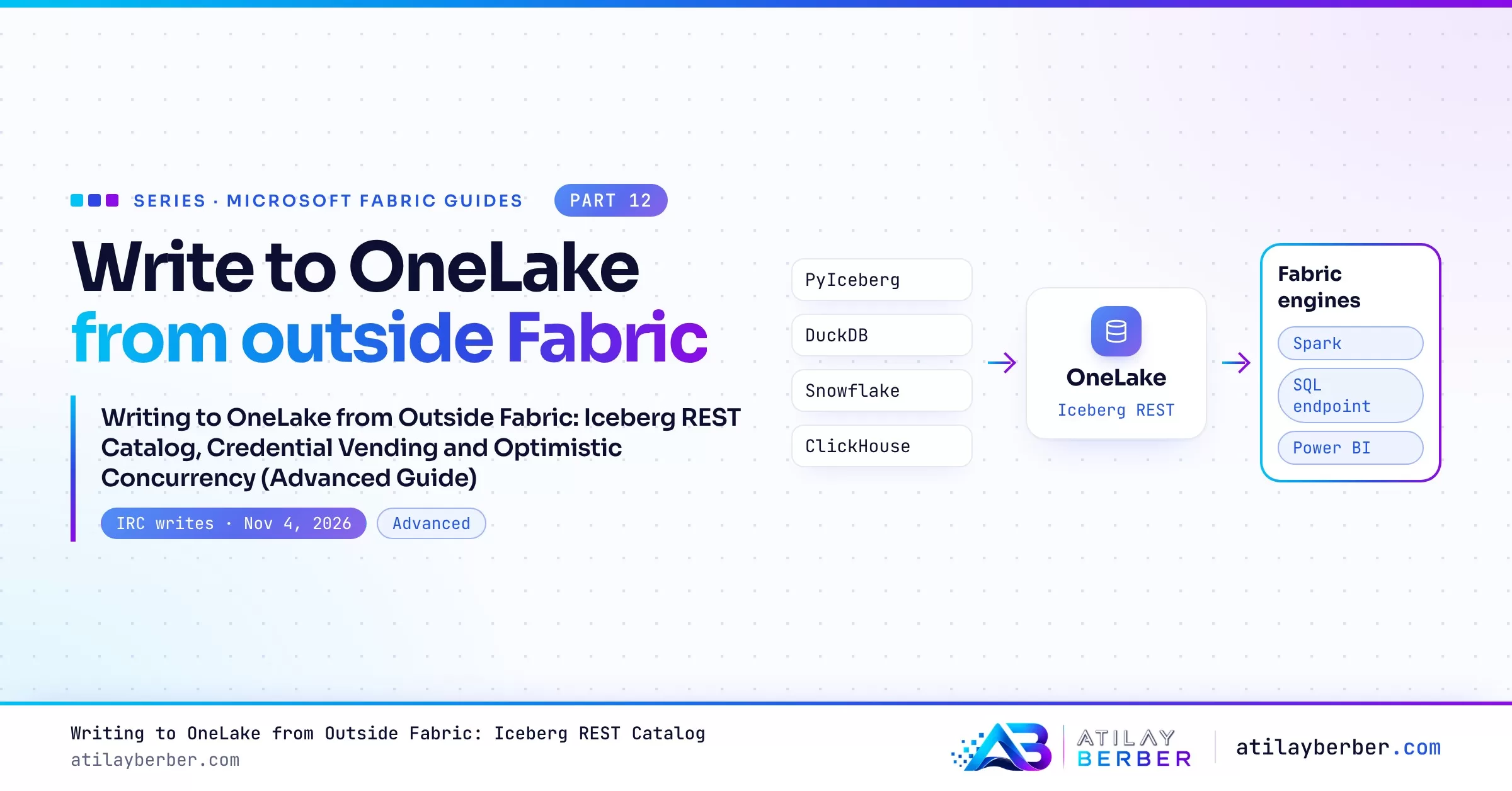
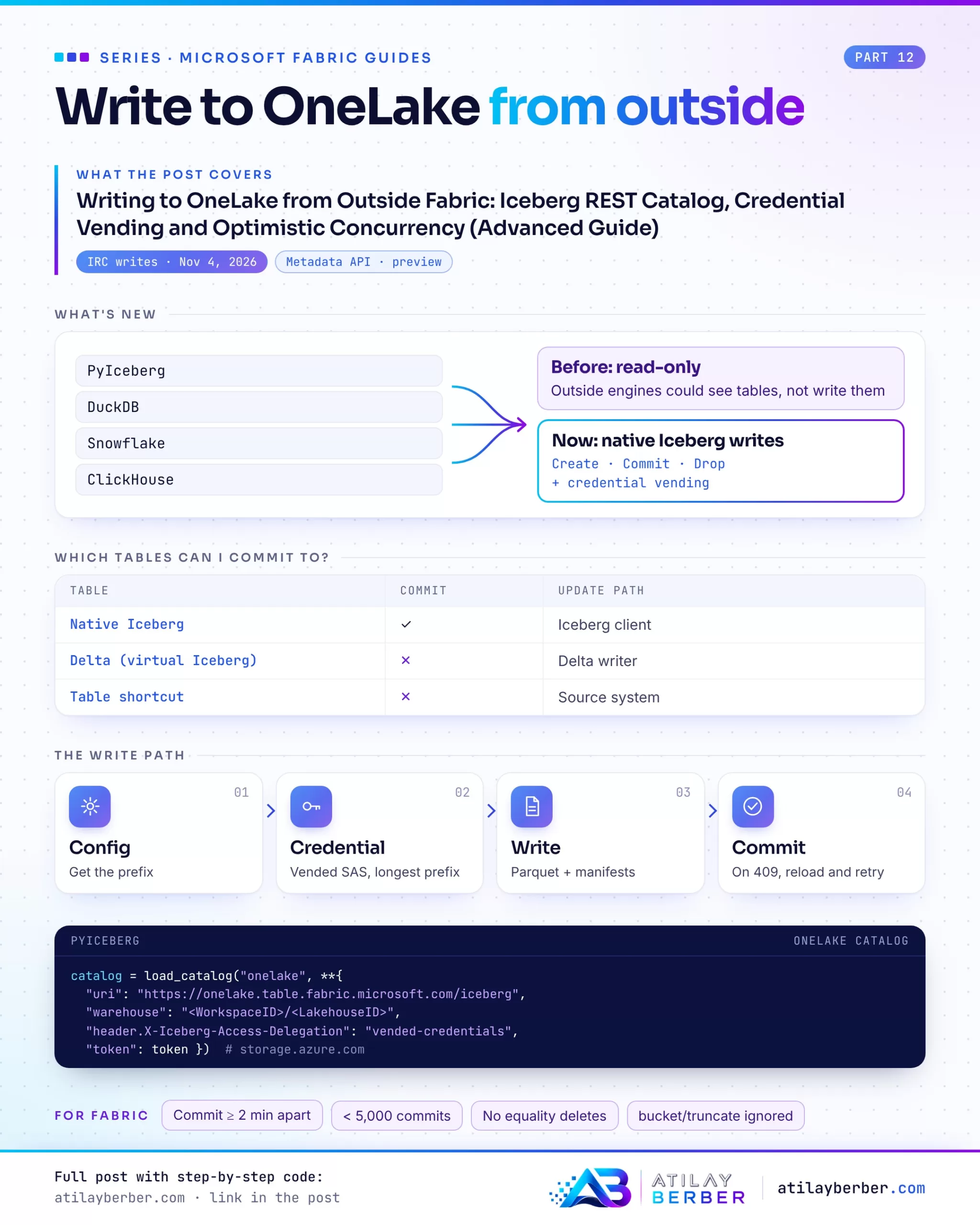
That changed on November 4, 2026. Microsoft announced that Iceberg REST Catalog (IRC) writes are now available at the OneLake table endpoint: outside engines can create native Iceberg tables in OneLake, commit new snapshots and drop tables. PyIceberg, DuckDB, Snowflake and ClickHouse can use it today.
This isn’t a “how do I connect” post. What I want to explain is how writing actually works under the hood: why the catalog and storage are separate, how vended storage credentials get matched to the right location, what happens when two writers collide, and which design rules keep a table you wrote outside Fabric healthy once Fabric reads it.
The big picture: three layers
When you write to OneLake from outside, you deal with three separate layers:
1. The catalog endpoint: https://onelake.table.fabric.microsoft.com/iceberg. It speaks the open Iceberg REST Catalog standard. It finds tables, creates them and accepts commits. It never carries rows, only metadata.
2. OneLake storage: Parquet data files, manifests and metadata.json files are written here directly, by your client, not by the catalog.
3. Virtualization: OneLake generates a virtual Delta log (_delta_log/) for a native Iceberg table. Fabric engines see the table as a Delta table through that virtual log.
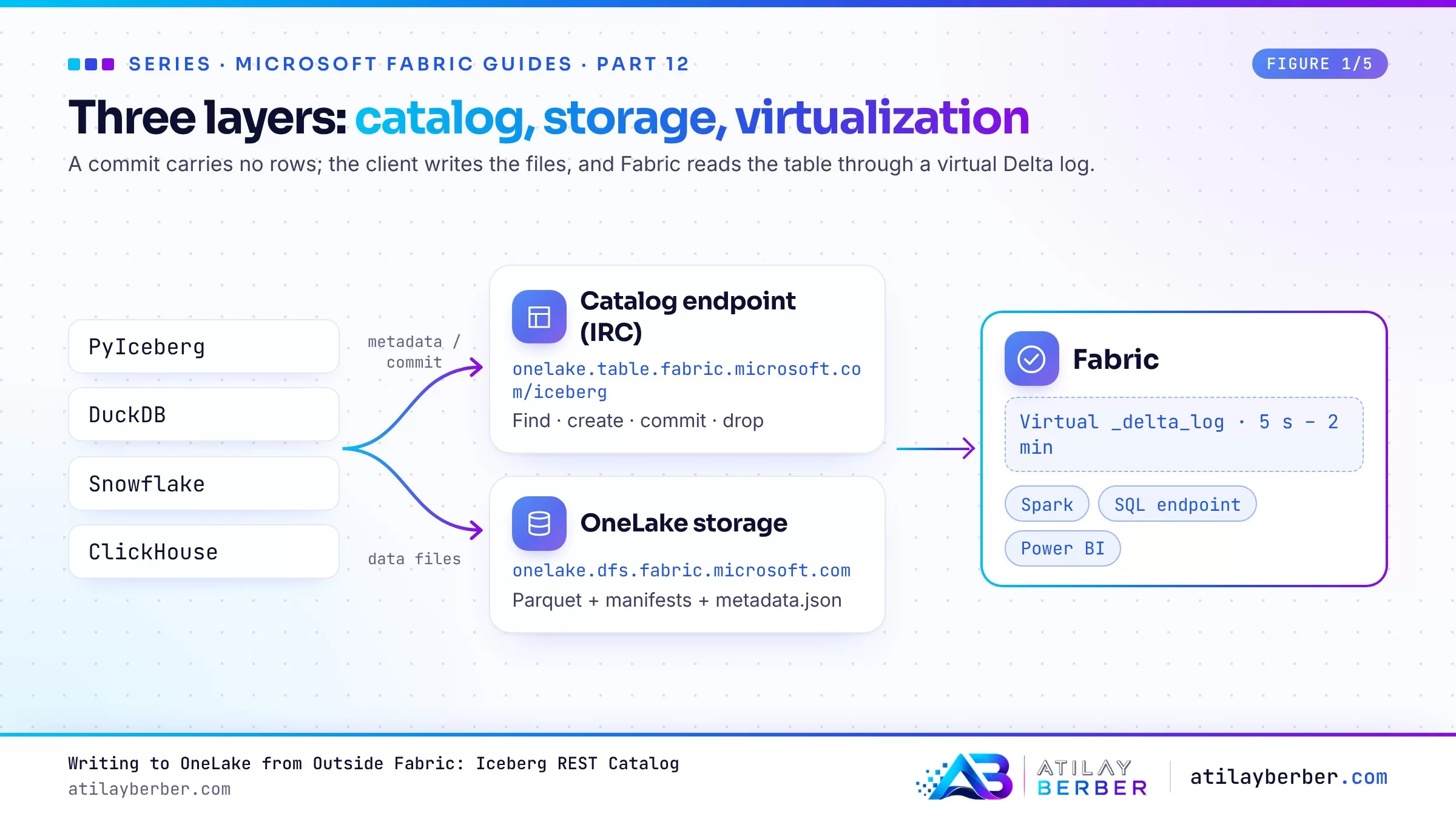
That split drives everything else. Because a commit carries no rows, the client that writes data files needs storage access. Because Fabric engines read the table through a virtual Delta log, the limits of virtualization become the limits of your table design.
Native Iceberg and virtual Iceberg are not the same thing
There are three kinds of Iceberg-related tables in OneLake, and each allows different things:
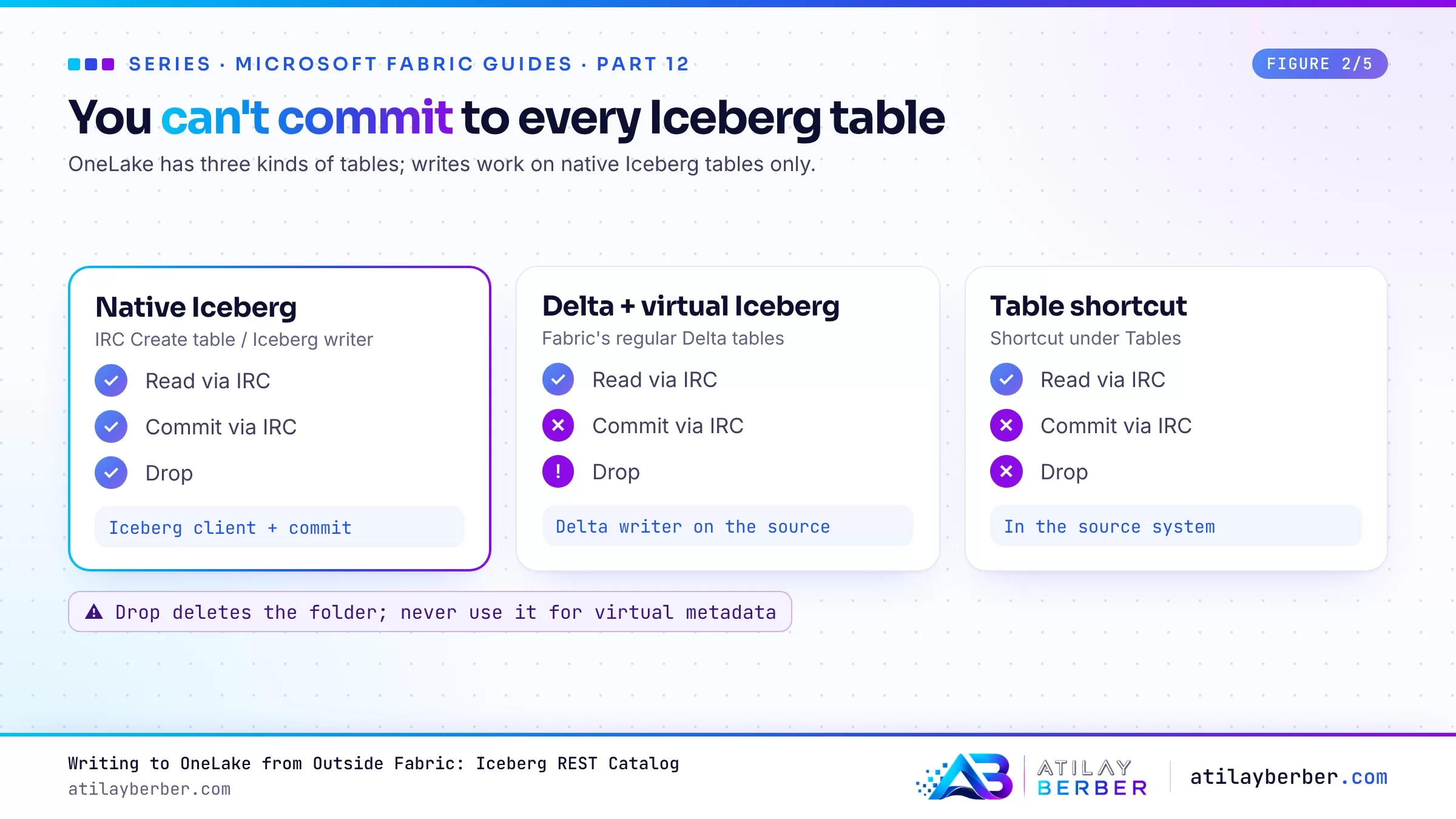
| Table | How it’s created | Read via IRC | Commit via IRC | How to update it |
|---|---|---|---|---|
| Native Iceberg | IRC Create table or an Iceberg writer | Yes | Yes | Iceberg client + catalog commit |
| Delta table (virtual Iceberg metadata) | Regular Fabric Delta tables | Yes (if conversion is on) | No | A Delta-compatible writer |
| Table shortcut | Shortcut under Tables | Yes | No | In the source system |
Learn is explicit: the virtual Iceberg metadata generated for Delta tables gives Iceberg clients read compatibility; it doesn’t support catalog commits. To update a Delta table, write to it with a Delta writer.
To read Delta tables from Iceberg clients, turn on the Enable Delta Lake to Apache Iceberg table format virtualization setting in your workspace settings. You don’t need it to create a native Iceberg table.
Endpoint and supported operations
The base URL is https://onelake.table.fabric.microsoft.com/iceberg. <Prefix> comes from the configuration response and is usually the same as <Warehouse>.
| Operation | HTTP |
|---|---|
| Get configuration | GET /v1/config?warehouse=<Warehouse> |
| List / get / check namespaces | GET, GET, HEAD /v1/<Prefix>/namespaces[/<Schema>] |
| List / get / check tables | GET, GET, HEAD /v1/<Prefix>/namespaces/<Schema>/tables[/<Table>] |
| Create table | POST /v1/<Prefix>/namespaces/<Schema>/tables |
| Commit table updates | POST /v1/<Prefix>/namespaces/<Schema>/tables/<Table> |
| Drop table | DELETE /v1/<Prefix>/namespaces/<Schema>/tables/<Table> |
| Load table credentials | GET /v1/<Prefix>/namespaces/<Schema>/tables/<Table>/credentials |
Details worth knowing:
- Anything not listed isn’t supported. There’s no
register table, for example. The multi-table/v1/transactions/commitfrom the IRC standard isn’t listed either, which fits with the Learn DuckDB sample attaching withDISABLE_MULTI_TABLE_COMMIT true. - Namespace = schema, one level. IRC supports multi-level namespaces, but in OneLake the top-level namespaces are Fabric schemas, so the
parentparameter forlist namespacesisn’t supported. Items without schema support expose a fixeddbonamespace. - Drop really drops.
Drop tableremoves the catalog entry and deletes the table’s OneLake directory, data and metadata included. Don’t use it to clean up the virtual Iceberg metadata of a Delta table. - Errors come in two shapes. Per Learn, some environments return OneLake-formatted errors (
code+message) instead of IRC’sIcebergErrorResponse. Check both the HTTP status and the body.
Authentication, addressing and permissions
- Token: Get a Microsoft Entra ID token for the Azure Storage audience:
https://storage.azure.com/.default. The table endpoint accepts the same audience as the OneLake filesystem endpoints. - Warehouse:
<WorkspaceID>/<ItemID>, or with names that contain no special characters,<WorkspaceName>/<ItemName>.<ItemType>(for exampleSales/Raw.Lakehouse). - Write permission: You need write access to the target item and OneLake location, through an item or workspace role, or ReadWrite in a OneLake data access role.
- Tenant settings for Snowflake: In the admin portal, *Service principals can use Fabric APIs* and *Users can access data stored in OneLake with apps external to Fabric* must be on. For writes from Snowflake on Azure, the Fabric capacity and the Snowflake account must be in the same Azure region.
The write path, step by step
Learn describes the write workflow in three sentences: the client creates or loads the table through the catalog, writes files directly to OneLake, then commits the metadata update through the catalog. In practice there are five steps:
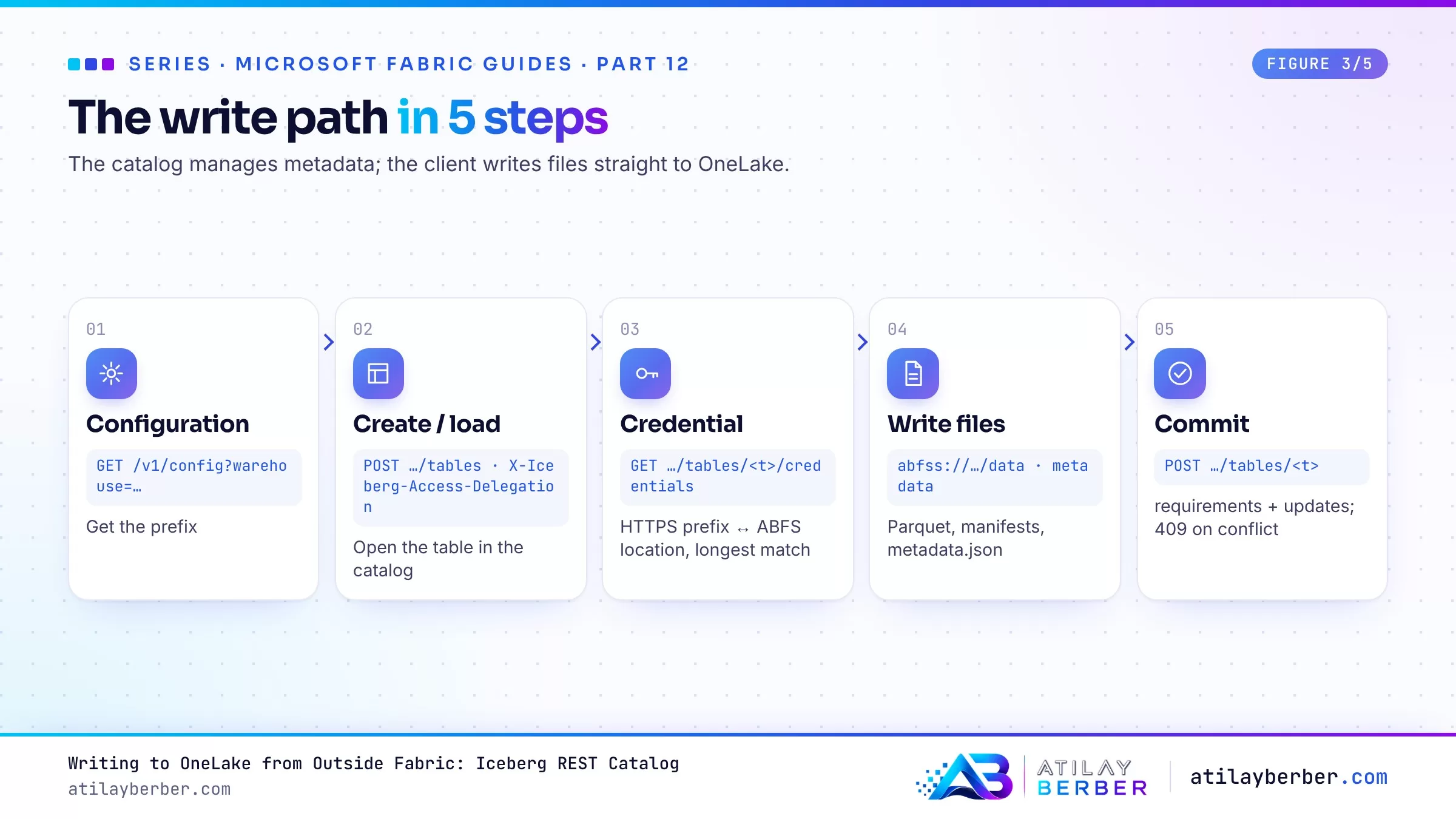
1. Configuration. GET /v1/config?warehouse=... returns the prefix. Every later path is built from it.
2. Create or load the table. Add the X-Iceberg-Access-Delegation: vended-credentials header to the load request and the response can include temporary storage credentials.
3. Match the credential to the right location. Credential vending returns temporary SAS credentials for an existing table, each with a prefix that says where it applies. The subtle part: OneLake returns those prefixes in HTTPS form, while locations in Iceberg metadata use ABFS (abfss://...). The client has to translate the table location to HTTPS and pick the longest matching prefix. The Learn sample does exactly that:
from urllib.parse import urlsplit

location = urlsplit(table.location())          # abfss://<workspace>@onelake.dfs.fabric.microsoft.com/...
https_location = f"https://{location.hostname}/{location.username}{location.path}"
storage_config = catalog.load_credentials(ident, https_location)  # picks the most specific prefix
4. Write the files. Parquet data files, manifests and a new metadata.json go to OneLake. Don’t do this by hand; Learn recommends an Iceberg client that handles both the storage writes and the catalog commit.
5. Commit. The client sends a CommitTableRequest with requirements and updates. The catalog checks the requirements first; if any one fails, the commit is rejected.
The whole flow with PyIceberg (simplified from the Learn sample, PyIceberg 0.12.0):
import pyarrow as pa
from urllib.parse import urlsplit
from azure.identity import DefaultAzureCredential
from pyiceberg.catalog import load_catalog
from pyiceberg.io import load_file_io

token = DefaultAzureCredential().get_token("https://storage.azure.com/.default").token
catalog = load_catalog("onelake", **{
    "uri": "https://onelake.table.fabric.microsoft.com/iceberg",
    "token": token,
    "warehouse": "<WorkspaceID>/<LakehouseID>",
    "header.X-Iceberg-Access-Delegation": "vended-credentials",
})

def load_with_io(ident):
    """Load the table and rebuild its FileIO with a temporary OneLake credential."""
    table = catalog.load_table(ident)
    loc = urlsplit(table.location())
    https_loc = f"https://{loc.hostname}/{loc.username}{loc.path}"
    creds = catalog.load_credentials(ident, https_loc)
    table.io = load_file_io({
        **table.io.properties, **creds,
        "adls.account-name": loc.hostname.split(".")[0],
        "adls.account-host": loc.hostname.replace(".dfs.", ".blob.", 1),
    }, location=table.location())
    return table

ident = ("dbo", "order_summary")
batch = pa.Table.from_pylist([{"id": 1, "store": "Izmir-01", "amount": 1250.0}])
catalog.create_table(identifier=ident, schema=batch.schema)
load_with_io(ident).append(batch)   # writes the files, then commits the snapshot
In DuckDB (1.5.6) you can do the same in SQL:
ATTACH '<WorkspaceID>/<LakehouseID>' AS onelake (
    TYPE ICEBERG,
    SECRET onelake_catalog,
    ENDPOINT 'https://onelake.table.fabric.microsoft.com/iceberg',
    ACCESS_DELEGATION_MODE 'vended_credentials',
    STAGE_CREATE_TABLES false,
    DISABLE_MULTI_TABLE_COMMIT true
);

CREATE TABLE onelake.dbo.order_summary (id INTEGER, store VARCHAR, amount DOUBLE);
INSERT INTO onelake.dbo.order_summary VALUES (1, 'Izmir-01', 1250.0);
Snowflake connects OneLake as a catalog-linked database: create a catalog integration with ACCESS_DELEGATION_MODE = VENDED_CREDENTIALS, then run CREATE ICEBERG TABLE, INSERT and UPDATE.
Optimistic concurrency: when two writers commit at once
This is the most advanced part, and most teams hit their first conflict in production.
Iceberg has no locks. Each writer reads the table, writes its own files, then asks the catalog to commit on the assumption that “the table is still in the state I read”. Those assumptions travel in the requirements field. Per Learn, they make conflicting updates fail instead of overwriting a newer table state.
The requirement types in the IRC standard are assert-create, assert-table-uuid, assert-ref-snapshot-id, assert-last-assigned-field-id, assert-current-schema-id, assert-last-assigned-partition-id, assert-default-spec-id and assert-default-sort-order-id. For appends, the one that matters most is assert-ref-snapshot-id: “the main branch still points at the snapshot I read.”
An illustrative commit request (following the IRC schema, values are examples):
{
  "requirements": [
    { "type": "assert-table-uuid", "uuid": "<table-uuid>" },
    { "type": "assert-ref-snapshot-id", "ref": "main", "snapshot-id": 7 }
  ],
  "updates": [
    { "action": "add-snapshot", "snapshot": { "snapshot-id": 8, "parent-snapshot-id": 7, "manifest-list": "abfss://.../snap-8.avro", "...": "..." } },
    { "action": "set-snapshot-ref", "ref-name": "main", "type": "branch", "snapshot-id": 8 }
  ]
}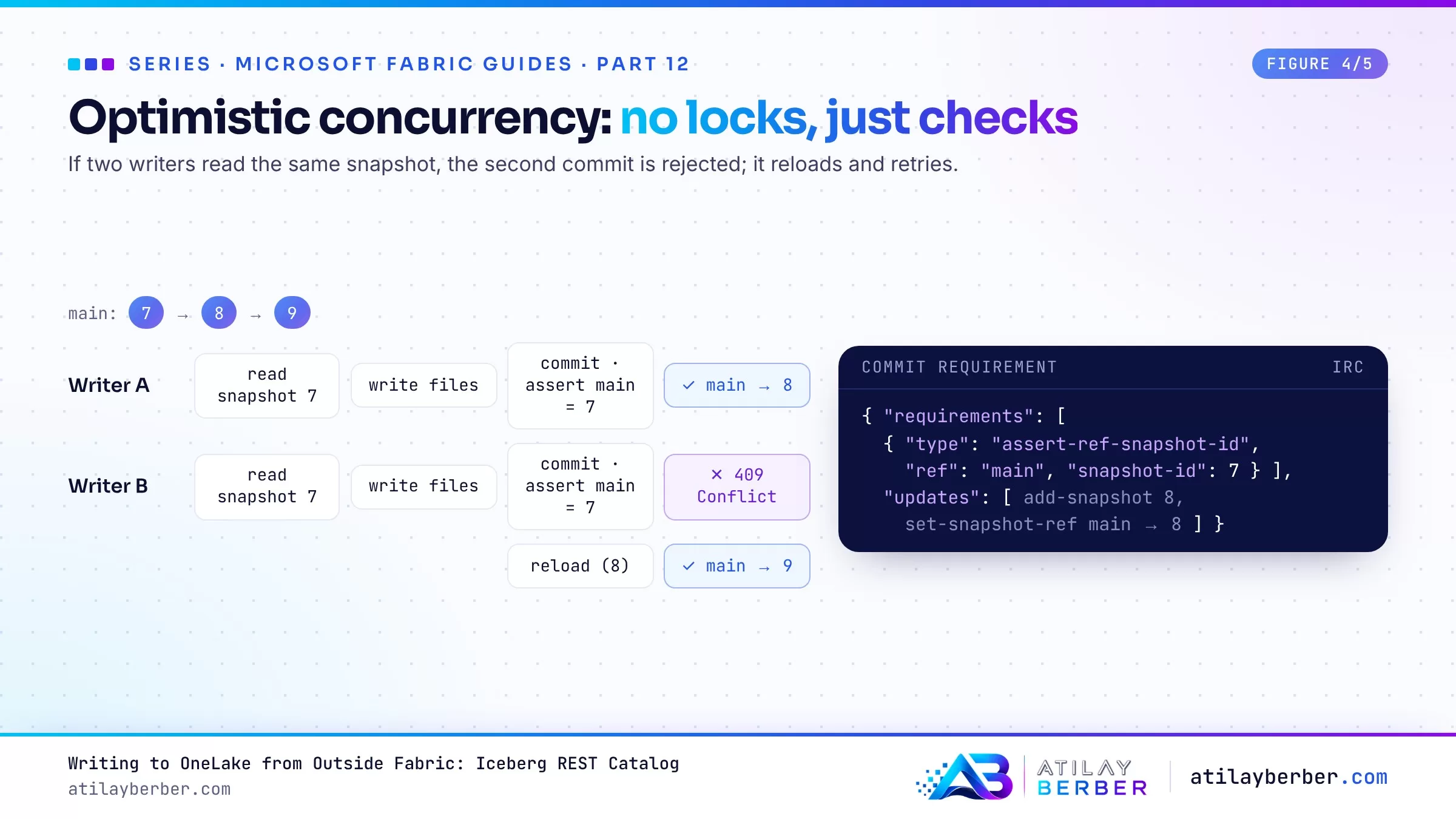
Here’s the scenario. Writers A and B both read snapshot 7. A commits first and main moves to 8. B’s request still says “main = 7″, so the catalog rejects it (in IRC that’s a 409 Conflict). B has to reload the table and reapply its work against the new state.
To handle this explicitly in PyIceberg:
import time
from pyiceberg.exceptions import CommitFailedException

for attempt in range(5):
    try:
        load_with_io(ident).append(batch)   # fresh snapshot + fresh credential on every try
        break
    except CommitFailedException:
        time.sleep(2 ** attempt)            # wait 1, 2, 4, 8, 16 s
else:
    raise RuntimeError("Could not commit after 5 attempts")
Two things to notice. First, you must reload the table before retrying; retrying with the old table object sends the same stale requirement again. Second, load_with_io also refreshes the credential each time. Learn asks you to refresh SAS credentials before expiration-time and rebuild the FileIO afterwards; skip that in a long-running job and you’ll get an authorization error halfway through a write.
The Fabric side: rules of the virtual Delta log
Your table is written. Now let’s look at how Fabric sees it, because that’s where the surprises are.
OneLake generates virtual Delta metadata for a native Iceberg table, and Fabric engines read it that way. The limits in Learn shape your table design directly:
- Latency: Metadata generation takes 5 seconds to 2 minutes. Learn recommends keeping source updates less frequent than once every 2 minutes, or the view in Fabric may be inconsistent. For a streaming writer committing every second, that’s a real design constraint: batch small commits and write less often.
- Commit count: Conversion is supported for tables with fewer than 5,000 transactions or commits. Compact logs or manifests if needed.
- Latest version only: Only the latest metadata version is converted. Iceberg snapshot history doesn’t show up as time travel in Fabric.
- Parquet only: Data files must be Parquet.
- Partitioning: Only identity and year/month/day/hour transforms are supported.
bucket[N],truncate[W]andvoidare ignored and the column stays unpartitioned. Live data files spanning multiple partition specs make conversion fail. - Deletes: Position deletes and V3 deletion vectors become Delta deletion vectors; equality deletes fail. Watch out for streaming engines that produce equality deletes.
- Schema changes: Column renames aren’t supported (recreate the table). Widening (
int→long) works; narrowing fails. - Types:
timeis dropped,uuidbecomesbinary. V3 types (variant,geometry,geography,timestamp_ns…) are dropped; Learn notes that some Fabric engines can’t read files with V3 types even after those columns are dropped, so avoid V3 columns for broad compatibility. - Metadata-only changes: A change like adding a column may not trigger reconversion; Learn suggests making a data change.
- On failure: The last successful conversion is kept.
latest_conversion_log.txtrecords the error asUSERorSYSTEM; for aUSERerror, fix the source and commit again.
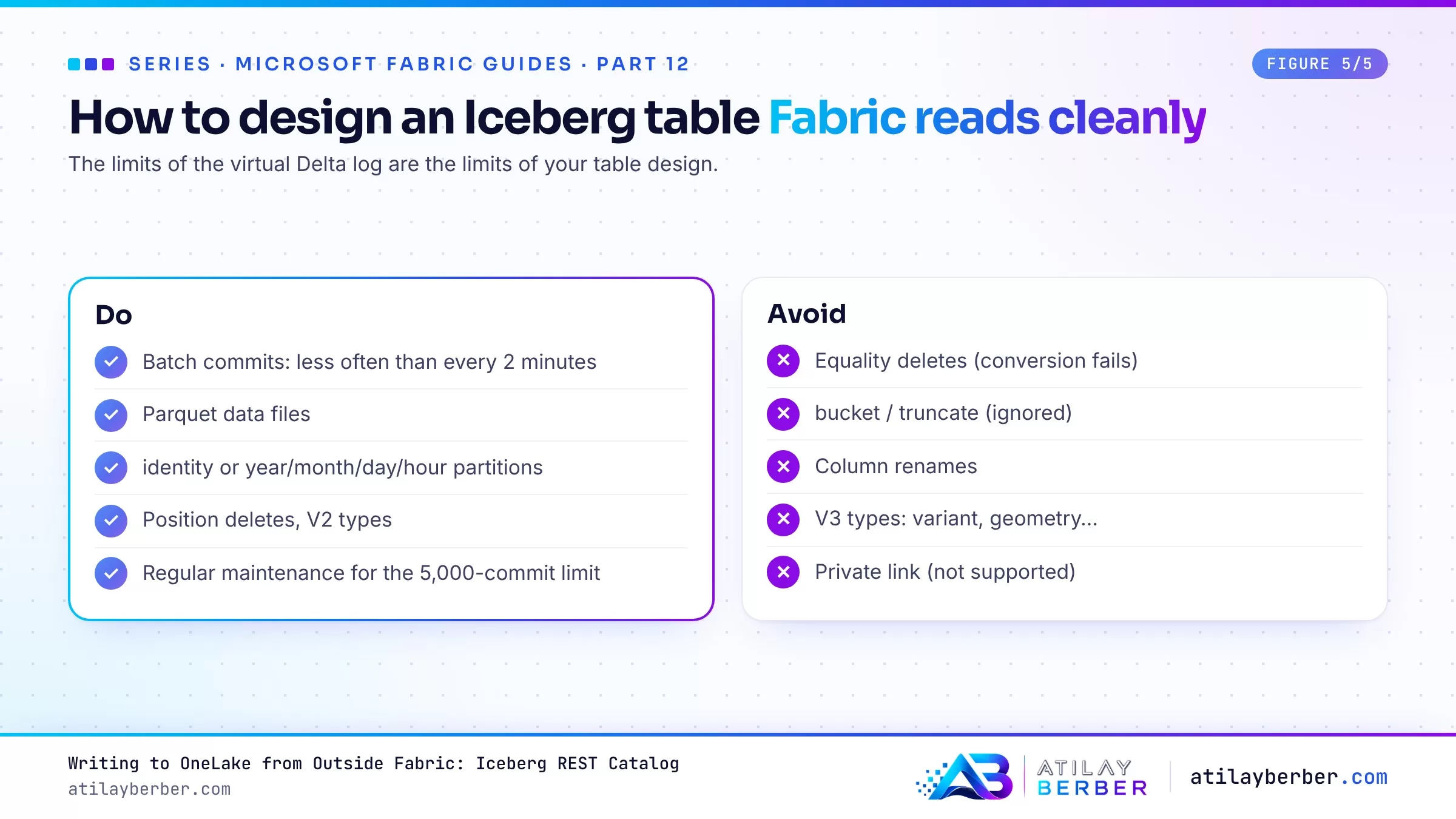
Table and column descriptions: the additional metadata API (preview)
The second piece in the same announcement is the additional table metadata API (preview), which writes descriptions and tags for tables and columns. It’s format-independent and uses a common route:
GET  https://onelake.table.fabric.microsoft.com/common/v1/<WorkspaceID>/<ItemID>/schemas/dbo/tables/order_summary/additionalMetadata
POST https://onelake.table.fabric.microsoft.com/common/v1/<WorkspaceID>/<ItemID>/schemas/dbo/tables/order_summary/additionalMetadata
{
"description": "Daily order summary per store. Computed in ClickHouse.",
"tags": { "domain": "sales", "owner": "data-team" },
"columns": [
{ "columnName": "store", "description": "Store code.", "tags": { "role": "store-key" } }
]
}The key rule: POST replaces everything; it’s not a partial update. Send only description and you wipe the existing table tags and every column description. Learn’s recommended sequence is GET → modify → POST the whole thing → GET again. There’s no built-in protection against concurrent writes, so coordinate your writers. Limits: descriptions up to 1,024 characters, tag keys up to 128 and values up to 256. Called through an internal OneLake shortcut, the operation applies to the target table’s metadata; passthrough shortcuts need permissions on both the shortcut and the target.
I see this as the easiest way to document the tables you write outside Fabric: the job that produces the table can write its description in the same run. Data agents and Copilot feed on these descriptions, so the payoff is bigger than it looks.
Security and networking
- OneLake security: According to Microsoft’s Ignite 2026 OneLake announcement, row- and column-level permissions defined with OneLake security also restrict access on Iceberg tables when the data is used in Fabric.
- A vended SAS is a secret. Don’t log it, and use it only for paths under the prefix it was issued for.
- Network: Iceberg virtualization isn’t supported with private links. Snowflake needs public network access to OneLake and doesn’t support workspaces protected by private link or other network restrictions.
- Region: The feature isn’t available in Qatar Central or Norway West. OneLake shortcuts to another lakehouse must be in the same region as the shortcut’s capacity.
Status: GA or preview?
I want to be straight about this. The November 4, 2026 Fabric announcement describes IRC writes as “now available”; the “Preview” label in its title refers to the additional metadata API from the same post. September’s FabCon Barcelona announcement listed Iceberg writes through Table APIs with credential vending as preview. The Learn pages currently carry no status label for write operations, while the additional metadata API and the table read API are clearly in preview. My advice: treat the write surface as new, try it on a test item first, and watch the Learn label for critical workloads.
My take: when should you use it?
I think this is the step that turns OneLake from “Fabric’s storage” into a multi-engine lakehouse catalog. It’s strongest when:
- Compute happens elsewhere, consumption happens in Fabric: summary tables produced in ClickHouse, DuckDB or Snowflake reach Power BI and Fabric without a separate ingestion pipeline.
- Agents write their results back: as in ClickHouse’s example, an analytics agent publishes its query results to the same catalog it reads from.
- Python teams write without Spark: for small and mid-sized transformations, PyIceberg or DuckDB can write without starting a Spark session.
The limits are just as clear: streams committing every few seconds, CDC engines producing equality deletes, tables relying on bucket partitioning and schemas with frequent column renames will cause trouble on the Fabric side. My rule: design the table for Fabric, not for Iceberg. That means identity or date partitioning, Parquet, position deletes, V2 types, batched commits every few minutes and regular maintenance.
Delta will clearly stay the default in Fabric. But the answer to “how does our data get into Fabric?” no longer has to be a pipeline every time. I’ve written about OneLake’s agent-first tools and Fabric HorizonDB’s bridges to OneLake; this post is the open-format side of the same story.
Which engines outside Fabric produce your tables, and how do you get them into Fabric today? Let me know in the comments or on LinkedIn.
Sources
- OneLake table APIs: Now with Iceberg writes, plus richer table metadata (Preview) — Fabric Updates Blog, November 4, 2026
- Iceberg metadata API (OneLake table APIs) — Microsoft Learn
- Iceberg table API samples — Microsoft Learn
- OneLake table APIs overview — Microsoft Learn
- Use Iceberg tables with OneLake — Microsoft Learn
- Additional table metadata API (preview) — Microsoft Learn
- OneLake: The unified foundation for data, context, governance, and AI — Fabric Updates Blog (Ignite 2026)
- FabCon and SQLCon Barcelona 2026: What’s new in Microsoft OneLake — Fabric Updates Blog
- ClickHouse now writes Apache Iceberg tables to Microsoft OneLake — ClickHouse Blog
- Iceberg REST Catalog Spec — Apache Iceberg