
Author: @atilayberber
The sentence I’ve heard most often in the Power BI world over the past year goes something like this: “Once Copilot arrives, we won’t have to fuss over the model so much.” The logic sounds reasonable. If the AI is smart enough, surely it can work out a table called tbl_FCT_SLS_2, a measure called Measure 7 and twelve unhidden ID columns on its own.
It can’t. And I think that’s the biggest misconception in BI in 2026.
This is a bit of a contrarian post. While everyone is talking about what Copilot, data agents and Power BI agents can do, I want to talk about why they so often can’t, and why the reason is almost always the model, not the AI.
What’s in this post
- Copilot reads your model, not your report
- The new cost of a bad model in the AI era: “convincingly wrong”
- Seven modeling mistakes that mislead Copilot
- Prep data for AI: AI data schemas, AI instructions and verified answers
- The two camps: “AI will figure out the data” vs. “fundamentals first”
- A checklist every model should pass before it meets Copilot
Copilot reads your model, not your report
That sentence sums up the whole debate. Copilot and Fabric data agents don’t learn from the nice visuals on your report page. They feed on the semantic model: table and column names, descriptions, synonyms, relationships, and the measures you defined (or didn’t).
A Fabric Community article published in June 2026 made the same point: the quality of Copilot and data agent answers depends on the context inside the Power BI semantic model. AI answers are only as good as the semantic model underneath them.
The practical consequence: model hygiene that teams postponed for years with “end users never see the model anyway, they see the report” now directly determines the answer an end user gets. Because with Copilot, the end user is talking to the model directly.
The new cost of a bad model: “convincingly wrong”
A bad model used to produce a bad report. Bad reports had one redeeming quality: they usually looked bad. An odd total, an empty visual, a meaningless filter. Users got suspicious and called the BI team.
A wrong answer from Copilot isn’t like that. It’s a fluent, coherent-looking paragraph that tries to cite its source. There’s no visual cue to make anyone suspicious. Microsoft’s own documentation states plainly that Copilot output is nondeterministic and doesn’t guarantee the same answer to the same question every time.
So the cost of a bad model didn’t go down in the AI era. It went up. It no longer just produces wrong numbers. It produces wrong numbers delivered with confidence.
Seven modeling mistakes that mislead Copilot
I’m using retail examples, but these mistakes look the same in every industry:
- Cryptic names.
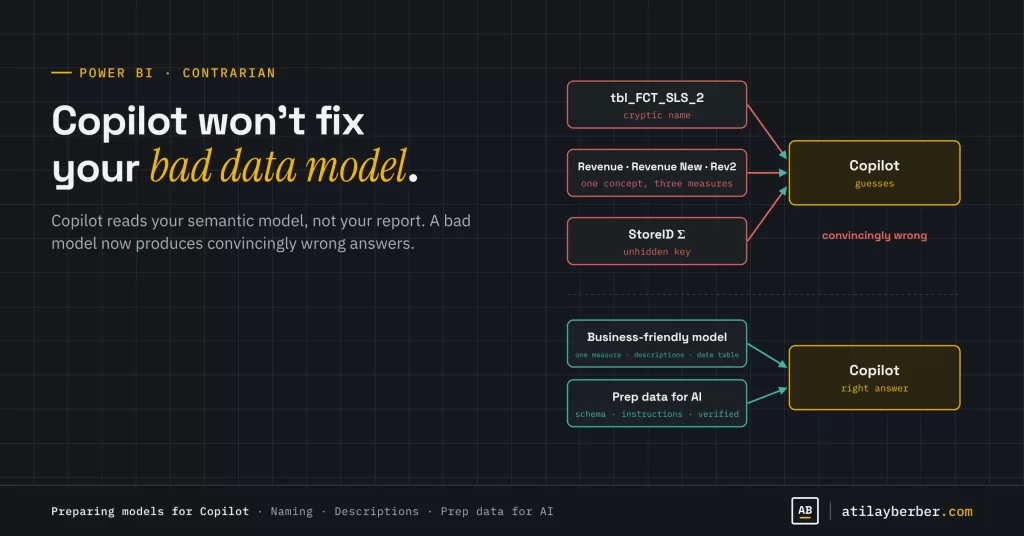
STR_CD,Amount2,NetSls_v3. A human learns them once and never forgets. Copilot guesses every single time. Business-friendly names like “Store Code,” “Discounted Amount” and “Net Sales” are the cheapest improvement you can make. - Unhidden key columns. As long as
ProductID,StoreIDandDateKeyare visible, Copilot may treat them as numbers to add up. Nonsense like “total product ID” usually comes from here. - Multiple measures for one concept.
Revenue,Revenue (excl. VAT),Revenue New,Revenue - DO NOT USE. When a user says “revenue,” which one? Copilot doesn’t know either. - Measures without descriptions. If nothing says whether a measure includes VAT, nets out returns or covers all stores, Copilot will try to infer it from the name. I showed how to generate descriptions quickly with Copilot in an earlier post, but checking that a generated description is correct is still a human job.
- Relying on implicit measures. Totals created by dragging a column onto a visual carry no business rules. Every critical metric should be an explicit measure.
- No date table, or one that isn’t marked. “Same period last year” can’t be answered consistently without a proper date table. I explained why it’s essential in the date table post.
- Ambiguous relationships. Bidirectional filters, multiple inactive relationships, bridge tables. If a human developer struggles to follow the path, expecting Copilot to pick the right one isn’t realistic.
Notice that there isn’t a single AI-specific item on this list. These are modeling rules we’ve known for a decade. Copilot just made the cost of breaking them visible.
Prep data for AI: Microsoft’s answer
Microsoft knows about this problem and offers three tools in Power BI under the name Prep data for AI:
| Tool | What it does |
|---|---|
| AI data schema | Choose which parts of the model Copilot should see, leaving out noisy and confusing fields |
| AI instructions | Give Copilot business context in plain language (“When someone says revenue, use net sales excluding VAT”) |
| Verified answers | Define approved visuals that answer specific questions, triggered by phrases you set |
What Microsoft Learn says you should know:
- All changes are saved to the semantic model, not the report. Prep you do once applies to every experience built on that model.
- You can do it from the Home ribbon in Desktop or on the semantic model in the service. Changes can take a few minutes to show up in Copilot results.
- For testing, the skill picker in the Copilot pane lets you simulate different scenarios. For troubleshooting, use the downloadable diagnostics and the “How Copilot arrived at this” section of an answer.
- You can mark a tested model as Approved for Copilot. The change usually takes effect within an hour, but can take up to 24 hours for models with many reports. Admins can limit standalone Copilot to approved items only.
- The documentation currently says Power BI Q&A must be enabled on the model for Prep data for AI. With Q&A retiring at the end of December 2026, I expect that requirement to change, so it’s worth keeping an eye on.
But it needs saying clearly: Prep data for AI doesn’t make a bad model good. It makes a good model easier for Copilot to understand. You can’t write your way out of twelve “Revenue” measures with AI instructions. Fix the model first.
The two camps
Camp 1: “AI will figure out the data”
- Large language models get better every year. The Copilot that struggles with cryptic names today may infer them from context tomorrow.
- Agents can review models now. They can find bad names and unhidden keys and fix them. We discussed this in AI Agents Now Build Power BI Reports.
- Waiting until every model is perfect means postponing the benefits of AI for years.
Camp 2: “Fundamentals first”
- No matter how smart the model, it can’t know a business rule nobody wrote down. Whether revenue includes VAT isn’t in the data. It’s an organizational decision.
- Yes, agents can fix models. But a human still decides which fix is the right one.
- Wrong answers are expensive. When an executive sees one wrong number, trust is gone and they never ask Copilot again.
My take
I’m in the second camp, with one twist. I don’t think this is a “fundamentals first, AI later” sequence. Copilot is a quality test for your model. Opening a model to Copilot and watching the answers users get is the fastest way to find where that model is ambiguous. Every question that gets a wrong answer points to a spot in the model that needs fixing.
So the right strategy isn’t to wait for Copilot. It’s to open Copilot to a controlled group and build a loop that feeds every wrong answer back into the model. AI won’t rescue a bad model, but it will make a bad model visible. That’s worth almost as much.
A checklist before you open a model to Copilot
- ☐ Are all table and column names in business language?
- ☐ Are key and technical columns hidden?
- ☐ Is there exactly one explicit measure for each critical metric?
- ☐ Does each measure’s description state its scope and rules, and has someone verified those descriptions?
- ☐ Is there a marked date table?
- ☐ Are relationships single-direction and free of ambiguity?
- ☐ Has the scope been narrowed with an AI data schema?
- ☐ Are there AI instructions for your most important terms?
- ☐ Are there verified answers for the 10 most frequent questions?
- ☐ After testing, is the model marked Approved for Copilot?
Conclusion
Copilot won’t fix your bad data model. It will turn your bad data model into wrong answers faster, more fluently and more convincingly. The good news is that fixing this doesn’t need new technology. The modeling rules we’ve known for a decade are enough. In the AI era, the most valuable investment a BI team can make isn’t a new AI feature. It’s a clean, documented semantic model with a single version of the truth.
What’s your experience? Have you opened Copilot in your organization, and which question does it get wrong most often? Share in the comments or on LinkedIn.
Sources
- Prep data for AI in Power BI (Microsoft Learn)
- Copilot-Ready Power BI: Preparing Semantic Models for AI (O’Reilly)
- AI answers are only as good as the Power BI semantic model underneath (Collab365)
- Copilot in Power BI won’t fix bad data (Adastra)
- MC1218421 – Retirement of Power BI Q&A
STAY IN THE LOOP
New guides, sorted by topic in a single email.
Every Monday, the week's new posts arrive grouped by topic. No new posts, no email.
2 comments