
Author: @atilayberber
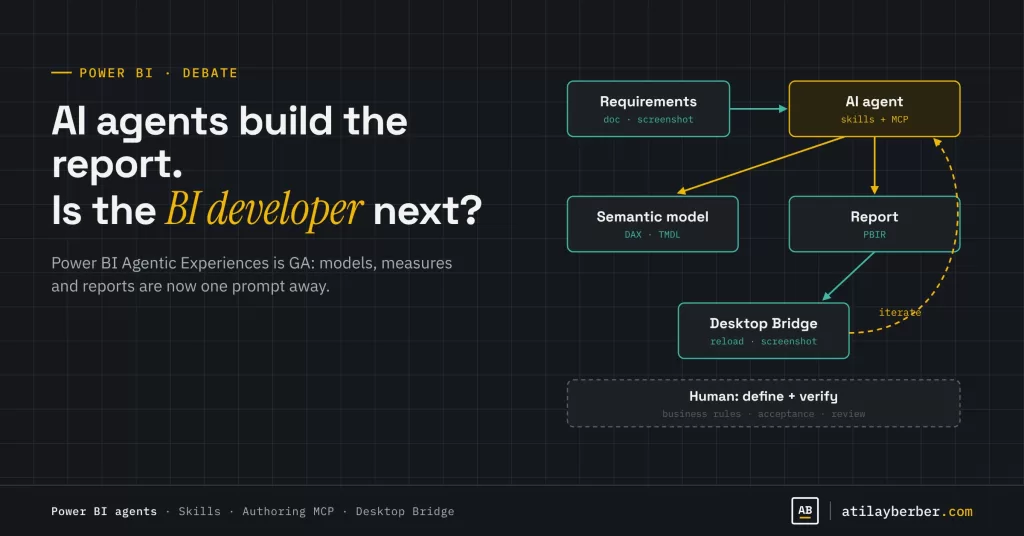
Not long ago, “Will AI replace Power BI developers?” was a half-joke you’d hear over coffee at a conference. Since September 2026, nobody is laughing. At FabCon Barcelona, Microsoft made Power BI Agentic Experiences generally available. You hand an AI agent a requirements document, or even a screenshot of the report you want, and it inspects the semantic model, writes the DAX measures, builds the report pages, reloads them in Power BI Desktop, takes a screenshot to check its own work, and iterates.
In this post I want to separate what has genuinely changed from what is being oversold, and explain how I read this as someone who builds BI solutions for a living. Fair warning: this is not a “relax, nothing is changing” post.
What’s in this post
- What Power BI Agentic Experiences actually is, and what it’s made of
- What the agent can really do today, and where it falls short
- The two camps: “it won’t replace analysts” vs. “it can replace experts today”
- My take: the tasks are going away, the role isn’t
- Five skills that will define BI developers in 2027
- A practical starting plan for teams
What is Power BI Agentic Experiences?
First, an important distinction: this isn’t a toggle inside Power BI. According to Microsoft Learn, Power BI Agentic is a bundle of skills and tools you install into a coding agent such as GitHub Copilot, Claude Code or Cursor. You bring the agent. Microsoft supplies the instructions that teach it Power BI and the tools that let it touch Power BI.
The bundle has two layers:
| Layer | What it does | Examples |
|---|---|---|
| Skills | Folders of instructions that tell the agent what to do | semantic-model-authoring (models, measures, relationships, refresh, DAX performance), powerbi-report-cli (create, validate and publish PBIR report definitions) |
| Tools | Connections that let the agent do it | Power BI Authoring MCP server, Power BI Desktop Bridge |
I covered the Authoring MCP server in a separate deep dive. The new piece is the Desktop Bridge, a local server hosted inside the Power BI Desktop process. It lets the agent reload a running Desktop instance and capture screenshots, so it can actually look at what it built. That’s the piece that ends the era of the agent working blind.
I won’t repeat the installation steps here; all three setup paths are covered step by step in the Authoring MCP guide.
One caveat: Microsoft labels the overall experience GA, but some underlying components, including certain skills and the hosted Authoring MCP server, are still in preview. The local Authoring MCP server is GA.
There’s also a quiet but important change underneath all of this: PBIR is now the default report format. Editing and saving a PBIR-Legacy report converts it automatically. Moving reports to a text-based format that lives in Git and that agents can read and write is the plumbing this whole agentic era runs on.
What can the agent really do today?
James Serra’s Barcelona roundup describes the flow well. You give the agent requirements or a screenshot of the target layout and ask for a sales dashboard. The agent:
- Inspects the semantic model: tables, relationships, existing measures.
- Creates or fixes the DAX measures it needs.
- Builds pages and visuals and applies formatting.
- Validates the report definition.
- Reloads Desktop and captures screenshots.
- Looks at the result and iterates.
Where this shines is repetitive, well-defined work. “Add YTD, prior year and percent change measures to this model, describe each one and put them in a Time Intelligence folder” takes seconds. So does roughing out the skeleton of a report page.
But underline “well-defined.” The agent is exactly as good as the definitions it’s given. If it doesn’t know whether “Sales” includes VAT, where returns are netted out, or which stores are excluded from comparisons, it will produce a wrong report very quickly and very confidently.
The two camps
There are two clear camps on this, and each gets something right.
Camp 1: “It won’t replace analysts. It raises the bar.”
This is the general thesis from training-side voices such as Pragmatic Works: Copilot and agents don’t replace the analyst, they raise the bar for the skills the analyst needs. Without someone shaping the model properly, Copilot behaves like a rookie analyst making guesses.
Microsoft’s own answers on the community forums point the same way. Copilot today focuses on data exploration, report creation, insight generation and working with the semantic model. A deep architectural review of a large, heavily customized model is still specialist work.
Camp 2: “It can replace some experts today.”
On the other side there’s a telling signal. In March 2026, a Microsoft employee published a Tech Community post whose title claimed Microsoft 365 Copilot can replace Power BI optimization experts today, complete with prompts for improving semantic models, Power Query and report speed.
The headline is provocative, but the point underneath deserves to be taken seriously. “Review this model and list unused columns, wrong data types and expensive DAX patterns” is work consultants have billed by the hour for years. A good chunk of it is now one prompt away.
My take: the tasks are going away, the role isn’t
I think both camps are describing the same elephant from different ends. Here’s how I draw the line.
What disappears is a category of tasks. Aligning visuals. Writing ten variations of the same measure. Rebuilding the standard report template for every new project. Running the basic performance checklist by hand. These either move to the agent entirely or shrink to a sliver of the job. If most of a BI developer’s week goes into this kind of work, feeling uncomfortable reading this is the right reaction.
What doesn’t disappear is a role. The person who defines the business rule, owns the question “which number is the right number?”, verifies what the agent produced and is accountable for the result. Serra lands in a similar place: technical expertise remains critical, but where it’s applied is shifting, away from writing every line and toward designing the architecture, defining the outcome, setting guardrails and validating what the AI produces.
Let me make that concrete with a retail example. A grocery chain asks for a like-for-like sales growth report. An agent can build it in an hour. But if the answers to these questions aren’t in the model, the agent will simply invent them:
- How many months after opening does a new store join the comparable set?
- What happens to a store that closed for two weeks for a refit?
- How do you adjust for a public holiday that falls in April one year and March the next?
None of these are DAX questions. They’re business questions. The person who knows the answers, documents them and encodes them in the model becomes more valuable in the agent era, because if that definition only lives in someone’s head, the agent will work from a different assumption every time.
Five skills that will define BI developers in 2027
- Specification. Not “build me a sales report,” but scope, business rules and acceptance criteria. A well-written requirements doc for an agent is now worth as much as the code itself.
- Semantic model design. Agents and Copilot don’t read your reports, they read your model. Naming, descriptions, relationships and measure definitions decide how accurate the AI will be. I go deeper on this in Copilot Won’t Fix Your Bad Data Model.
- Validation. Comparing the agent’s measure against a known number and testing edge cases. Being the person who catches the gap between “it runs” and “it’s right.”
- Engineering discipline. PBIP/PBIR, Git, code review, deployment pipelines. If an agent is going to change things, every change needs to be reviewable and reversible.
- Product thinking. Serra’s question matters here: should this be a report or an app? As we discussed in Will Fabric Apps Replace Power BI Reports?, the decision is moving from “how do I build this report?” to “what experience does the user actually need?”
A practical starting plan for teams
- Start small and repetitive. Measure descriptions, standard time intelligence measures, a page skeleton.
- PBIP + Git first. See every agent change as a commit. No agent change reaches production without human review.
- Build a validation dataset. Known numbers for known periods. Every measure the agent writes gets tested against them.
- Write down your business rules. That document becomes the source for agent instructions and model descriptions.
- Measure it. Track time spent and correction rate on agent-assisted work. “It feels faster” and “it is faster” are not always the same thing.
Conclusion
AI agents building Power BI reports is no longer a demo, it’s a GA experience. It isn’t the end of the BI developer. It may well be the end of how a BI developer’s week used to look. The developer who aligns visuals and copies measures will be replaced by the developer who defines business rules, designs the model and supervises the agent.
So my answer is clear: the BI developer isn’t next. What’s next is the idea that BI development was only ever about knowing the tool.
What’s your experience? Has anyone on your team built a report with an agent, and was it production quality? Let’s argue about it in the comments or on LinkedIn.
Sources
- Power BI agentic development overview (Microsoft Learn)
- Power BI Desktop Bridge overview (Microsoft Learn)
- Announcements from FabCon Barcelona 2026 (James Serra)
- Microsoft 365 Copilot can replace Power BI optimization experts today (Tech Community)
- Chat With Your Data – What Is It? (Pragmatic Works)
STAY IN THE LOOP
New guides, sorted by topic in a single email.
Every Monday, the week's new posts arrive grouped by topic. No new posts, no email.