
Author: @atilayberber
Picture a sales manager’s morning. The old way: open Power BI, find the right workspace, open the report, pick the region filter, flip between two pages, copy a number into Excel, write an email to the team. The October 2026 way: type into Copilot Chat next to Outlook or Teams, “Using our Sales Performance report, compare this quarter’s revenue with last quarter by region,” read the answer, then ask, “Draft an email to my team summarizing those findings.”
Without ever opening the report.
Fabric IQ in Microsoft Copilot Chat and Cowork, made generally available at FabCon Barcelona, puts the most uncomfortable question in BI on the table: if users get their answers from a chat, do we still need dashboards?
What’s in this post
- What changed: Fabric IQ arrives in Copilot Chat and Cowork
- Q&A is retiring: why December 2026 is a turning point
- The two camps: “the dashboard is dead” vs. “the dashboard is where trust lives”
- My take: dashboards aren’t dying, their job is changing
- New metrics BI teams should be tracking
- A preparation checklist for admins
What changed?
Here’s what Microsoft announced as GA in Barcelona, plus the related pieces around it:
| Announcement | Status | What it means |
|---|---|---|
| Fabric IQ in Microsoft Copilot Chat and Cowork | GA | Governed Power BI insights come to the Copilot experience people already use |
| Fabric IQ MCP endpoint | GA | The same trusted Power BI insights open up to agent-building tools outside Fabric |
| Fabric data agents in Copilot Studio | GA | Enterprise agents can connect to governed data |
| Restrict from Copilot | GA | Admins can decide which content stays out of Copilot |
| Microsoft 365 Copilot inside Power BI and Fabric | Public preview | Licensed initial preview, off by default |
| Fabric data agents in Copilot Chat | Sneak peek | Demo only for now |
The details matter. The Cowork experience uses Power BI reports and their underlying semantic models while respecting existing permissions and row-level security. The September announcement also highlights citations, sensitivity labels and coverage of reports published through org apps. Microsoft says these insights come with no additional AI token costs, while normal Copilot and Cowork licensing and applicable usage charges still apply.
So the sales manager can’t see a region in the chat that they couldn’t see in the report. Technically, this isn’t “skip the dashboard.” It’s “walk into the model behind the dashboard through a different door.”
I covered setting up data agents in Teams and Microsoft 365 Copilot in a separate guide. This post isn’t about setup. It’s about what this shift does to BI itself.
Q&A is retiring
The timing of this debate isn’t a coincidence. According to Microsoft Message Center notice MC1218421:
- Power BI Q&A experiences and Q&A Setup will be retired by the end of December 2026.
- From December 2026, you can no longer create new Q&A visuals.
- Existing Q&A visuals will stop working and will be removed.
- Setup tools such as synonyms, linguistic relationships and Teach Q&A are retired too.
- The recommended replacements are Power BI Copilot and Prep data for AI.
Power BI’s decade-long approach to “ask a question in plain language” is officially closing and handing over to generative AI. If you have Q&A visuals in your reports, this isn’t a debate topic. It’s a to-do item.
The two camps
Camp 1: “The dashboard is dead”
This camp is at least partly right:
- Usage statistics for most dashboards are already painful. A report that took weeks to build gets opened by a handful of people a month, most of whom look at one number and leave.
- Users want to ask in their own words, not navigate filters the BI team guessed in advance.
- The answer arrives inside the flow of work: in email, in Teams, in meeting notes. The cost of switching context drops close to zero.
- A large share of “can we build another dashboard?” requests really mean “I need an answer to one question.”
Camp 2: “The dashboard is where trust lives”
The other camp’s arguments are at least as strong:
- A chat doesn’t let you ask about what you don’t know. A dashboard shows you what you didn’t think to ask: a KPI turning red, an unexpected drop, a store behaving oddly.
- Copilot isn’t deterministic. Microsoft’s own documentation notes that Copilot output can differ between runs. “Last week it gave me a different number” is not a sentence anyone wants to hear in a board meeting.
- A shared view. When everyone in the weekly ops meeting looks at the same screen, the discussion is about actions, not numbers. Ten people with ten different chat answers can’t give you that.
- Monitoring isn’t a conversation. Operational screens tracking stock levels, checkout queues or order flow don’t wait for anyone to ask a question.
My take: dashboards aren’t dying, their job is changing
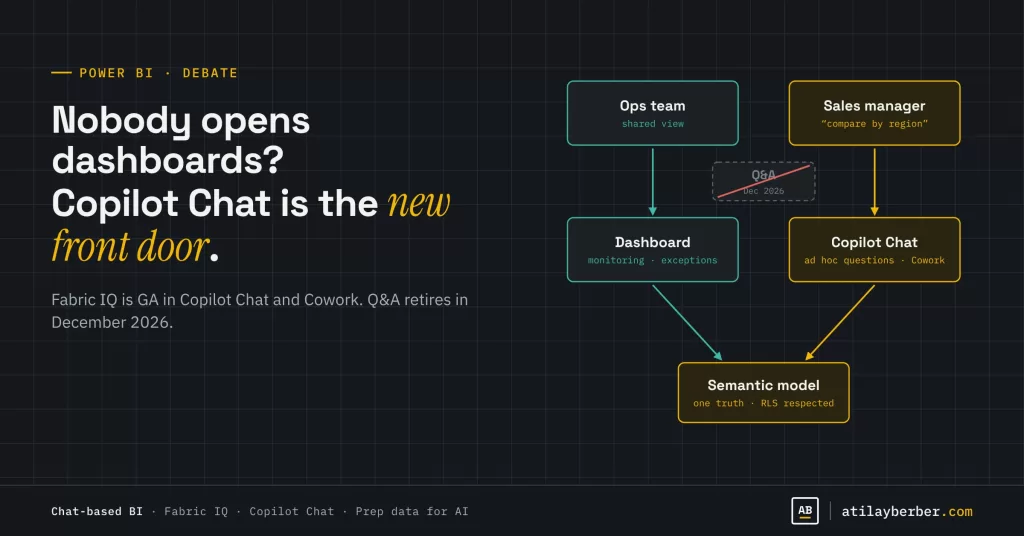
I don’t think the right question is “dashboard or chat?” The right question is which use case should come through which door?
| Use case | Best door |
|---|---|
| Ad hoc question (“Which category dropped most in our Izmir stores last month?”) | Copilot Chat / data agent |
| Routine monitoring and exceptions (KPIs, alerts) | Dashboard + Activator alerts |
| A shared view in a meeting | Dashboard |
| Deep analysis | Report + analyst |
| Data entry and action (revising targets, approvals) | Fabric App |
One thing in this table is easy to miss: every door opens into the same semantic model. Copilot Chat takes its answer from the report’s revenue definition. So as the dashboard matters less, the model behind it matters more. Dashboard design stops being shop-window work and becomes the model’s contract: the reference that shows which number is the official number and which definition produced it.
And to be honest: I don’t think Copilot Chat will save a bad model. If the model is bad, it used to produce bad reports. Now it will produce bad answers, in a more convincing tone. I dig into that in Copilot Won’t Fix Your Bad Data Model.
New metrics BI teams should be tracking
Report view counts no longer measure BI’s value on their own. If users get the number from a chat, your report can look like “nobody opens it” while your model answers hundreds of questions a day. Track these instead:
- Consumption per model: How often is the semantic model queried, not the report? Queries coming through Copilot belong in that picture.
- Answer quality: Answers users corrected or challenged.
- “Approved for Copilot” coverage: The share of your models you’ve officially opened to Copilot.
- Capacity consumption: Copilot usage eats capacity. I covered this in detail in the capacity post.
A preparation checklist for admins
- Inventory your Q&A usage. Find reports with Q&A visuals. At the end of December, they stop working.
- Decide which models Copilot can see. Mark tested, well-described models as “Approved for Copilot,” and consider Restrict from Copilot for sensitive content.
- Start with Prep data for AI. AI data schemas, AI instructions and verified answers are the tools replacing Q&A Setup.
- Train your users. The habit of checking where an answer came from is the most important safety net in chat-based BI.
- Review your dashboard portfolio. Reports nobody opens that only answer one question are retirement candidates. Operational monitoring screens deserve more investment, not less.
Conclusion
Copilot Chat has become Power BI’s new front door, but not its only door. Most ad hoc questions will move into the chat, and that’s a good thing. Dashboards will keep living for monitoring, exception management and shared views. The real winner is the room both doors open into: a well-designed, well-documented, trustworthy semantic model.
What’s happening in your organization? Do your users open the report or ask Copilot? Share in the comments or on LinkedIn, I’m genuinely curious.
Sources
- Announcements from FabCon Barcelona 2026 (James Serra)
- MC1218421 – Retirement of Power BI Q&A
- Prep data for AI in Power BI (Microsoft Learn)
- Microsoft 365 Copilot will now answer questions using your Power BI reports (Collab365)
STAY IN THE LOOP
New guides, sorted by topic in a single email.
Every Monday, the week's new posts arrive grouped by topic. No new posts, no email.