
Author: @atilayberber
The Fabric vs. Databricks debate usually runs on feature checklists. Whose Spark is faster, whose notebooks are nicer, whose governance is more mature. But when a CFO signs off on a data platform, the question they really care about is different: what happens when demand is higher than we planned for?
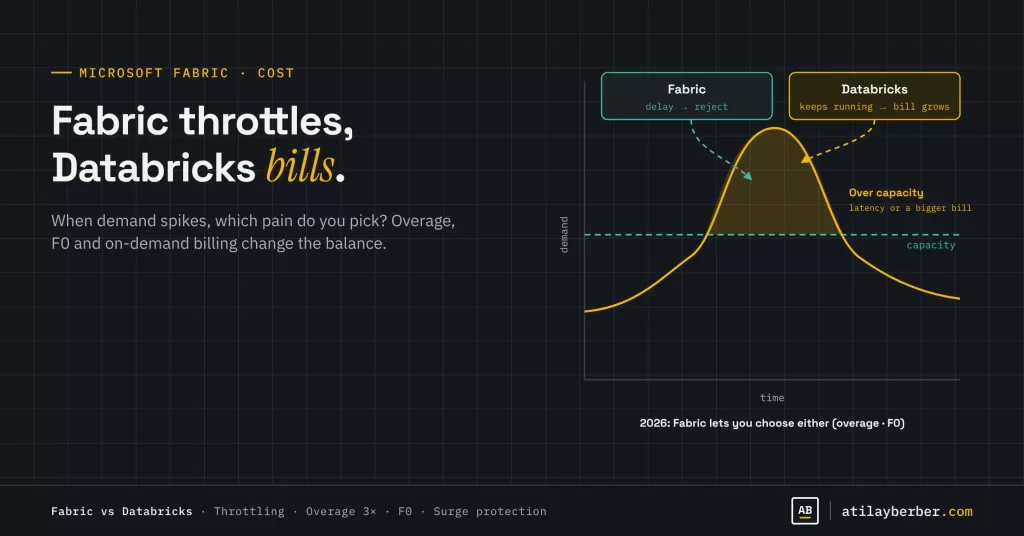
A comparison published in July 2026 captured the answer in one line, and it got passed around the community a lot: Fabric converts demand variance into latency, Databricks converts it into cost. When capacity runs out, Fabric slows down and eventually rejects work. Databricks keeps running and sends a bigger bill.
In this post I want to look at the choice between those two kinds of pain, including the new cost options Microsoft announced at FabCon Barcelona. The short version: by the end of 2026, the line between them is a lot blurrier than it used to be.
What’s in this post
- Two cost philosophies: capacity vs. consumption
- Comparing real prices (and why you can’t compare them directly)
- Fabric’s new cards: capacity overage, F0 and on-demand billing
- The two camps: “predictability” vs. “elasticity”
- My take: the real question is which risk you can manage
- Six questions to help you decide
Two cost philosophies
Fabric sells capacity. You buy an SKU, say F2, F8 or F64, and that capacity is shared by every workload: reports, refreshes, notebooks, pipelines and Copilot. The bill is fixed. Go over the capacity and smoothing kicks in, then delays, and finally rejected jobs. I walked through those mechanics step by step in the capacity and Copilot cost post, so I won’t repeat them here.
Databricks sells consumption. You pay per DBU (Databricks Unit), priced by workload type. When a busy day comes, clusters scale up, the job finishes, and at the end of the month the bill is bigger. Nobody calls asking why the report won’t open. Finance calls asking why this month is so high.
Both platforms have a failure mode. The difference is who feels it, and how.
Comparing real prices
Here are the figures from EPC Group’s comparison, based on Azure retail prices in July 2026 (US West 2, USD):
| Item | Price |
|---|---|
| Fabric, pay-as-you-go | $0.18 per CU-hour (all compute included) |
| Fabric, 1-year reservation | About 40.5% below pay-as-you-go; a reserved F64 is $60,032/year |
| Fabric capacity overage | 3×, i.e. $0.54 per CU-hour |
| Databricks Jobs Compute (Premium) | $0.30 per DBU-hour (excludes VM, disk, network) |
| Databricks All-purpose | $0.55 per DBU-hour (excludes VM) |
| Databricks Serverless SQL | $0.70 per DBU-hour (VM included) |
The same source makes an important point: there is no reliable CU-to-DBU conversion. $60,032 buys roughly 200,000 Jobs Compute DBU-hours before VM costs, or around 86,000 Serverless SQL DBU-hours with VMs included. Which gets more work done depends entirely on the workload. That’s why every chart online claiming “Fabric is X times cheaper” or “Databricks is X times cheaper” deserves some skepticism.
One more line item people forget: choosing Databricks doesn’t remove Power BI licensing. If your reports stay in Power BI, below F64 you still need Pro ($14 per user per month), Premium Per User ($24) or capacity. A total cost of ownership comparison that leaves this out is incomplete.
Fabric’s new cards
A year ago, “Fabric just throttles” was a completely fair criticism. Three changes from FabCon Barcelona shift the picture.
1. Capacity overage (GA)
Capacity overage bills eligible excess consumption so temporary overloads don’t turn into throttling. The rate is three times pay-as-you-go, applied to the relevant excess CU hours, not to all usage. Two things to keep in mind: overage doesn’t increase the SKU’s underlying resources, and its rolling spending threshold is not a hard spending cap.
In other words, Fabric can now behave “like Databricks” if you want it to. It can bill you instead of slowing down. At three times the price.
2. F0 and on-demand billing (public preview announced, rollout pending)
F0 is an entry point into Fabric and OneLake without choosing a baseline amount of compute first. On-demand billing is on by default, so supported workloads use compute as needed and are charged by consumption. The “zero” refers to compute provisioned in advance, not to processing power and not to price.
The most important consequence: organizations will be able to read and write OneLake data without keeping a dedicated Fabric capacity running just to access the lake. And you don’t have to pick one model for everything. Keep regular reporting on reserved capacity and run occasional Spark data-prep jobs on demand.
3. Workspace-level surge protection
You can stop a single workspace from consuming more than a set share of the capacity, with exemptions for mission-critical workspaces. This is the cure for “one analyst’s notebook took down the whole company’s reports.”
The two camps
Camp 1: “Predictability is everything” (team Fabric)
- The budget is fixed. Finance knows the number at the start of the year, with no surprise bills.
- One capacity carries every workload. That’s simpler than managing Databricks DBUs, Snowflake credits and Power BI per-user licenses as three separate bills.
- For BI-heavy organizations, Direct Lake and mirroring of operational databases are real advantages.
- Throttling hurts but it’s survivable. Moving jobs to off-peak hours often solves it.
Camp 2: “Elasticity is everything” (team Databricks)
- Fabric’s capacity model works on a “use it or lose it” basis. Buy extra headroom to avoid throttling and that capacity burns unused in quiet months.
- For large-scale ETL, machine learning and multi-cloud scenarios, Databricks’ maturity and flexibility stand out.
- Throttling looks free, but it isn’t. The cost of a sales team that didn’t get its morning report doesn’t show up on any invoice.
This camp has a weak spot too. According to Xomnia’s analysis, Serverless SQL behaves almost exactly like Snowflake, scaling instantly, but at a significantly higher price that erodes the platform’s cost advantage. Elasticity isn’t free either.
My take: the real question is which risk you can manage
I don’t think “which is cheaper?” has an answer, because the answer depends on the shape of your workload. The better question is: when demand spikes, which kind of pain can your organization tolerate?
- If finance can live with a fixed capacity line and an occasional slowdown is acceptable, Fabric’s natural model fits.
- If finance can absorb a variable bill but slowdowns are unacceptable, Databricks’ model fits.
What’s new at the end of 2026 is that Fabric now offers both. With overage you can choose to pay instead of slow down, and with F0 and on-demand billing you can run without holding capacity. That doesn’t automatically make Fabric better. But it does make “Fabric only throttles” an outdated criticism. The same goes for the claim that a reserved capacity can’t be increased; capacities can be resized.
Looking at it from retail: in a grocery chain, load is fairly predictable. Reports every morning, refreshes every night, peaks at month-end and before holidays. That’s the shape capacity pricing handles best. The real risk is the unpredictable work: a data scientist’s large notebook, or a sudden jump in Copilot usage during a campaign. Overage, surge protection and F0 exist to close exactly those gaps.
Six questions to help you decide
EPC Group’s six-axis fit test is a practical starting point. Answer each one with “Fabric” or “Databricks”:
- Consumption gravity: Is most data consumed in Power BI and Microsoft 365?
- Engineering gravity: Are your workloads mainly large-scale ETL and ML?
- Cloud posture: Single cloud (Azure) or multi-cloud?
- Governance mandate: Do you need governance centered on Microsoft Purview and Entra?
- Skills supply: Which platform does your team, and the people you can hire, actually know?
- Cost-shape tolerance: Is a fixed line or a variable bill easier for finance to manage?
According to the source, five or six “F” answers point to a Fabric-primary architecture, and five or six “D” answers to Databricks-primary. If consumption points to Fabric but engineering points to Databricks, running both makes sense: share data in OneLake and use each engine where it’s strongest. Fabric’s production support for storing Databricks data in OneLake makes that path easier.
Conclusion
“Fabric throttles, Databricks bills” still describes the natural behavior of both platforms well. But at the end of 2026, Fabric gives you dials to change that behavior: overage, F0, on-demand billing and surge protection. The choice is shifting from “which platform?” to “what do I want to happen when demand spikes, and who pays for it?”
Which poison would you pick: a late morning report or a surprise bill at month-end? Let’s argue about it in the comments or on LinkedIn.
Sources
- Microsoft Fabric vs Databricks Decision Framework (EPC Group)
- Announcements from FabCon Barcelona 2026 (James Serra)
- Capacity overage overview (Microsoft Learn)
- Databricks, Fabric, or Snowflake: Pricing Model & Strategy (Xomnia)
- Microsoft Fabric Capacity Units and Cost Predictability Explained (Mayhemcode)
STAY IN THE LOOP
New guides, sorted by topic in a single email.
Every Monday, the week's new posts arrive grouped by topic. No new posts, no email.