

Author: @atilayberber
Copilot in Power BI is being reshaped. Microsoft plans to replace the “standalone Power BI Copilot” experiences (the left-nav entry in the Power BI service, Copilot on Home, and Copilot in Teams and mobile) with Microsoft Copilot over time. The first concrete step is close: on December 8, 2026, the tenant setting defaults change. Here is what changes, what stays, and what you should check as a Fabric admin before that date.
In short
- Microsoft Copilot in Power BI and Fabric is in preview. It finds Power BI reports and answers questions over semantic models using Fabric IQ.
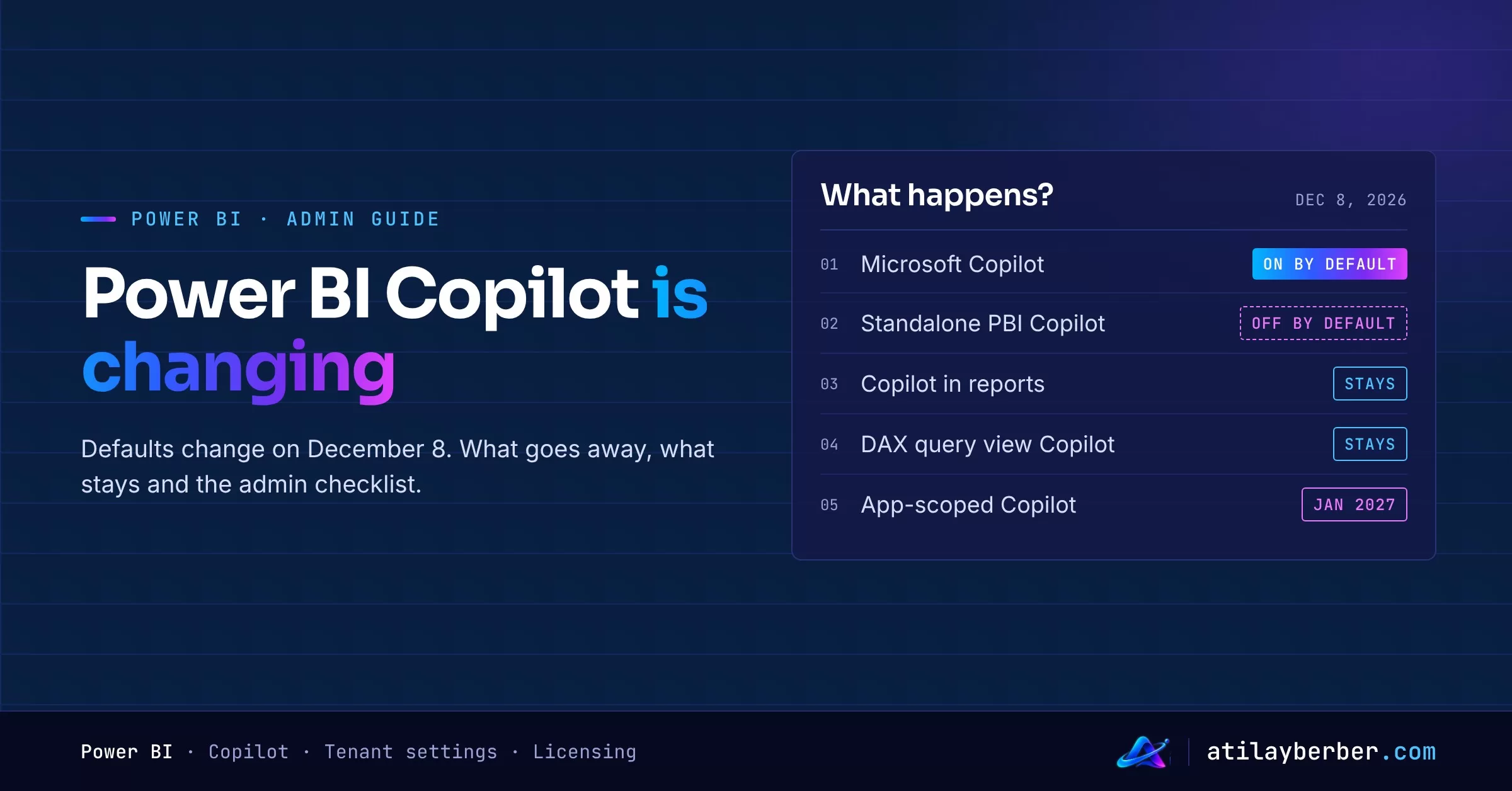
- December 8, 2026: Microsoft Copilot becomes on by default, and standalone Power BI Copilot becomes off by default. Choices an admin has already made are preserved.
- This is not a retirement date, only a change of defaults. Microsoft says it plans to end support for the standalone experiences by the end of January 2027, but official dates haven’t been announced yet.
- Copilot inside reports (service, Desktop, mobile), plus Copilot in web modeling and DAX query view, stays.
- App-scoped Copilot (preview) in workspace apps is being removed in January 2027.
What’s changing?
Today there are two Copilot front doors in Power BI:
- Standalone Power BI Copilot: the left-nav entry in the service, Copilot on Home, and Copilot in Teams and the Power BI mobile app.
- Microsoft Copilot in Power BI and Fabric (preview): the Microsoft Copilot experience brought into Power BI and Fabric. It answers with Fabric IQ, grounded in your reports and semantic models; users with a Microsoft 365 Copilot license can also bring in email, meeting and document context through Work IQ.
According to the November 2026 Feature Summary, Microsoft is extending the second experience to users without a Copilot Premium license and calls it “the next step toward replacing standalone Power BI Copilot.” The Microsoft Learn page spells out the future phase: the Microsoft Copilot setting will be on by default, it becomes the primary Copilot experience, and the standalone experience will be retired, with the final date announced in advance.
What exactly happens on December 8?
Right now, the Microsoft Copilot preview setting is off by default and an admin has to turn it on in the Fabric admin portal. On December 8, 2026:
- the Microsoft Copilot setting will be on by default,
- standalone Power BI Copilot will be off by default.
The key detail: Microsoft says existing admin choices are preserved. If you’ve deliberately configured these settings, the new defaults won’t override you. If you haven’t, your users may wake up to a different Copilot entry point on December 8.
Licensing: who gets what?
Based on the table on Microsoft Learn, the experience depends on the user’s Microsoft Copilot license:
| Experience | Fabric IQ (report and model data) | Work IQ (Microsoft 365 context) |
|---|---|---|
| Copilot (Premium) | Yes | Yes |
| Copilot Chat (basic) | Yes | No |
| M365 Copilot (basic) | Yes | No |
Worth noting: per Learn, a user’s Power BI license (Free, Pro or PPU) doesn’t determine which Microsoft Copilot experience they get. They still need permission to the content and the licensed access required to view it. The Feature Summary adds that basic users can reference reports by name, link or attachment, ask questions grounded in semantic models and keep going with follow-ups.
On security, no new door opens: Copilot doesn’t give access to content the user couldn’t open anyway, and RLS and OLS still apply. Answers reflect the data from the semantic model’s most recent successful refresh.
What isn’t changing?
- Report Copilot: Copilot inside reports in the Power BI service, Desktop and mobile remains supported.
- Developer side: Copilot in web modeling and in DAX query view stays.
- Workspace app content: even with app-scoped Copilot going away, app content, audiences and permissions stay the same, and users can still use Copilot in eligible reports opened inside an app.
In other words, what changes is the “ask anything across Power BI” door. Copilot inside reports and during modeling stays where it is.
Admin checklist before December 8
1. Document your current settings. In the Fabric admin portal under Tenant settings, write down the current state of the Copilot settings (who they apply to, which security groups). Setting names used on Learn:
- “Users can use Copilot and other features powered by Azure OpenAI”
- “Make Microsoft Copilot available in Power BI and Fabric” (preview; the blog post calls it “Users can access Microsoft Copilot in Power BI and Microsoft Fabric”, so the label in your portal may differ)
2. Make a deliberate decision. Do you want the new defaults to apply to you, or would you rather move on your own schedule? Make the call by explicitly configuring the setting, so December 8 brings no surprises.
3. Pick a pilot group. The Microsoft Copilot setting can be applied to the whole organization or to supported security groups. Start with a small group from the business.
4. Don’t forget the Microsoft 365 side. If “Fabric data available in Microsoft Copilot” is off in the Microsoft 365 admin center, the entry point may still appear, but Copilot can’t use Fabric data in its answers. “Share Fabric data with your Microsoft 365 services” affects discovery and recommendations; it doesn’t block explicit references by link or name.
5. Review the approved-items setting. If you use “Only show approved items in the standalone Copilot in Power BI experience”, Learn says Microsoft Copilot also honors it during the preview. Check which reports actually count as “approved.”
6. Get your semantic models ready. Copilot is only as good as the model behind it. Table, column and measure descriptions, clear names and hidden technical fields matter here too. I covered this in detail in my post on semantic model descriptions.
7. List your workspace apps. Find apps that use app-scoped Copilot (preview) and give their owners a heads-up about January 2027.
8. Prepare a short note for users. Two sentences like “This is where you open Copilot now; Copilot inside reports is unchanged” will save your support queue a lot of tickets.
Things to watch
- Preview: Microsoft Copilot in Power BI and Fabric is still in preview and may change before general availability. The preview rolls out to organizations progressively.
- Region: the tenant and the content must be in a supported region.
- Accuracy: the Learn page notes that answers can be wrong and recommends validating important decisions against the source data.
- Dates: end of January 2027 is Microsoft’s “plan”; official deprecation and retirement dates will be announced separately. Don’t hard-wire your internal plans to it.
My take
This is Copilot in Power BI turning from a separate product into part of Microsoft Copilot. For users, one Copilot door is simpler. For admins, the real job is not to let the defaults make the decision for you. A 30-minute settings review and a small pilot before December 8 are much cheaper than a wave of “why did Copilot change?” questions afterwards. I made the broader case about where Copilot fits in BI workflows in my post on Copilot Chat and dashboards.