

Author: @atilayberber
Picture a call center screen. To verify a customer, the agent needs the last two digits of a phone number. They don’t need the full number, the national ID, or the whole IBAN. Until now we either handled that in application code or made do with the fixed patterns of SQL’s Dynamic Data Masking (DDM), which usually hid everything or showed the wrong part.
On November 17, 2026, Azure Updates announced regex-based dynamic data masking as generally available (GA) for Azure SQL Database. You can now define a mask with a regular expression: “show the first three and last two digits”, “keep the email domain, hide the user name”, written once, in the database.
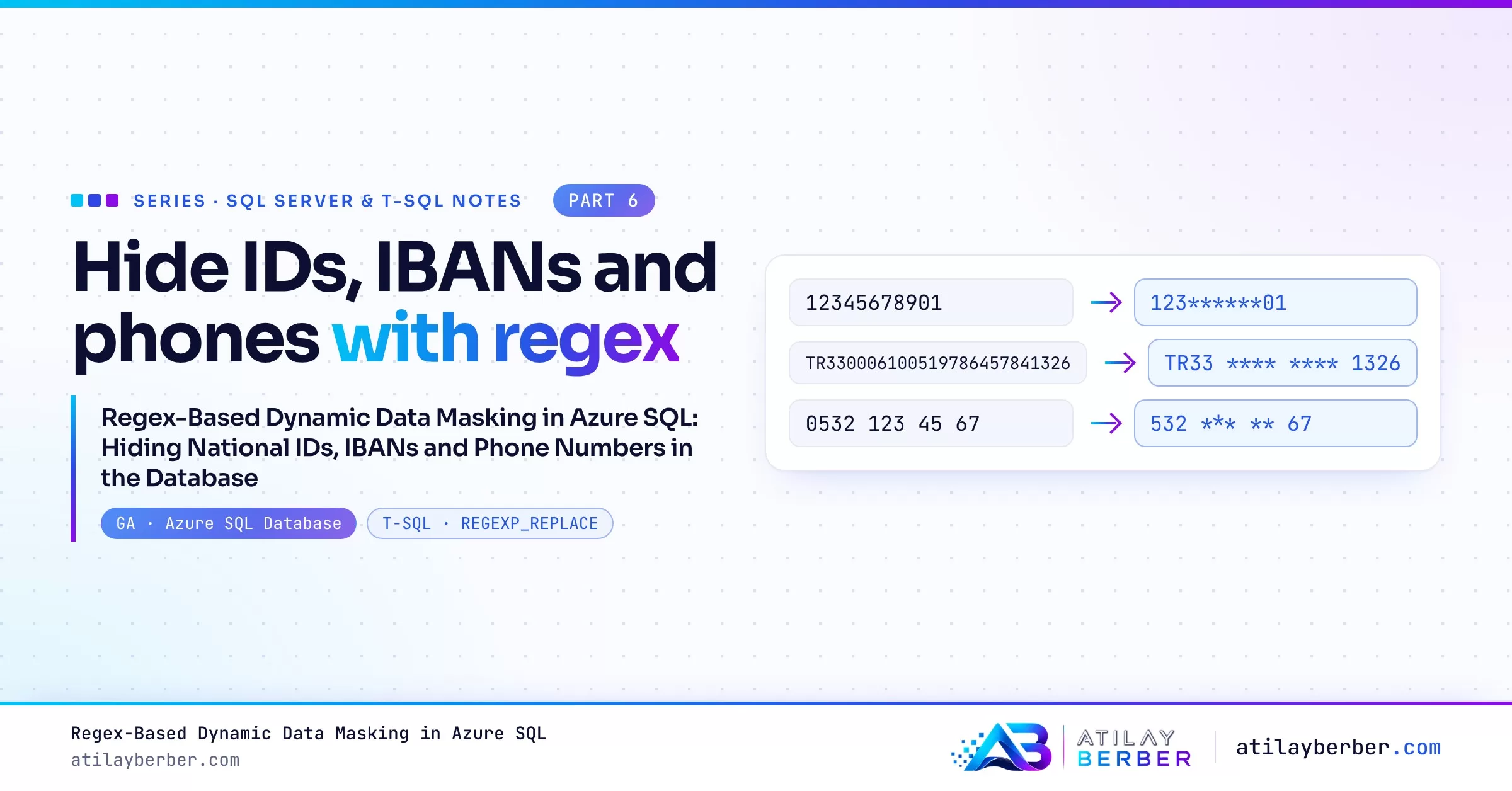
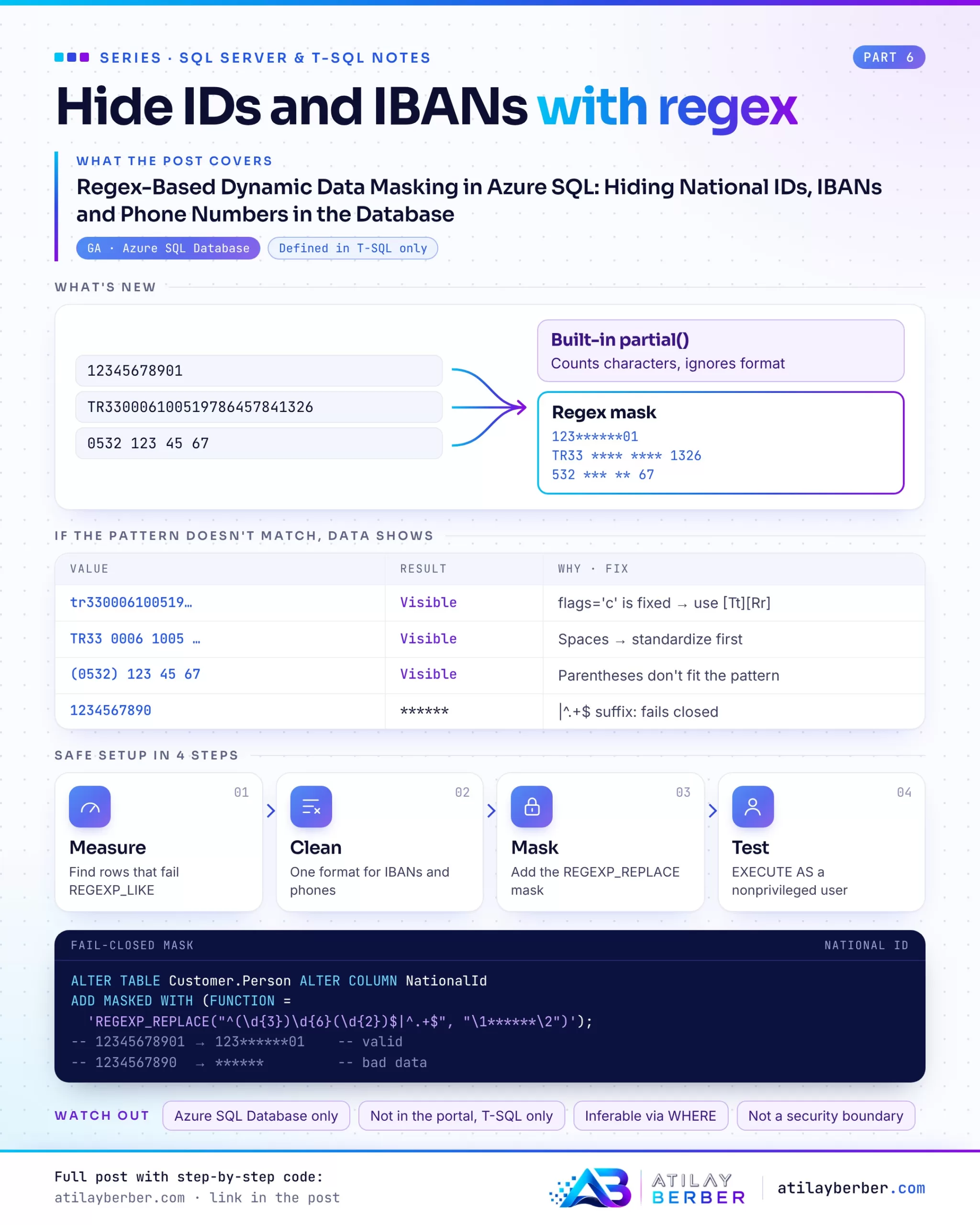
This post covers what the feature does, the syntax, sample masks for three common fields (national ID, IBAN, mobile phone), and what I think is the biggest trap: a value that doesn’t match the pattern comes back unmasked.
Dynamic data masking in one minute
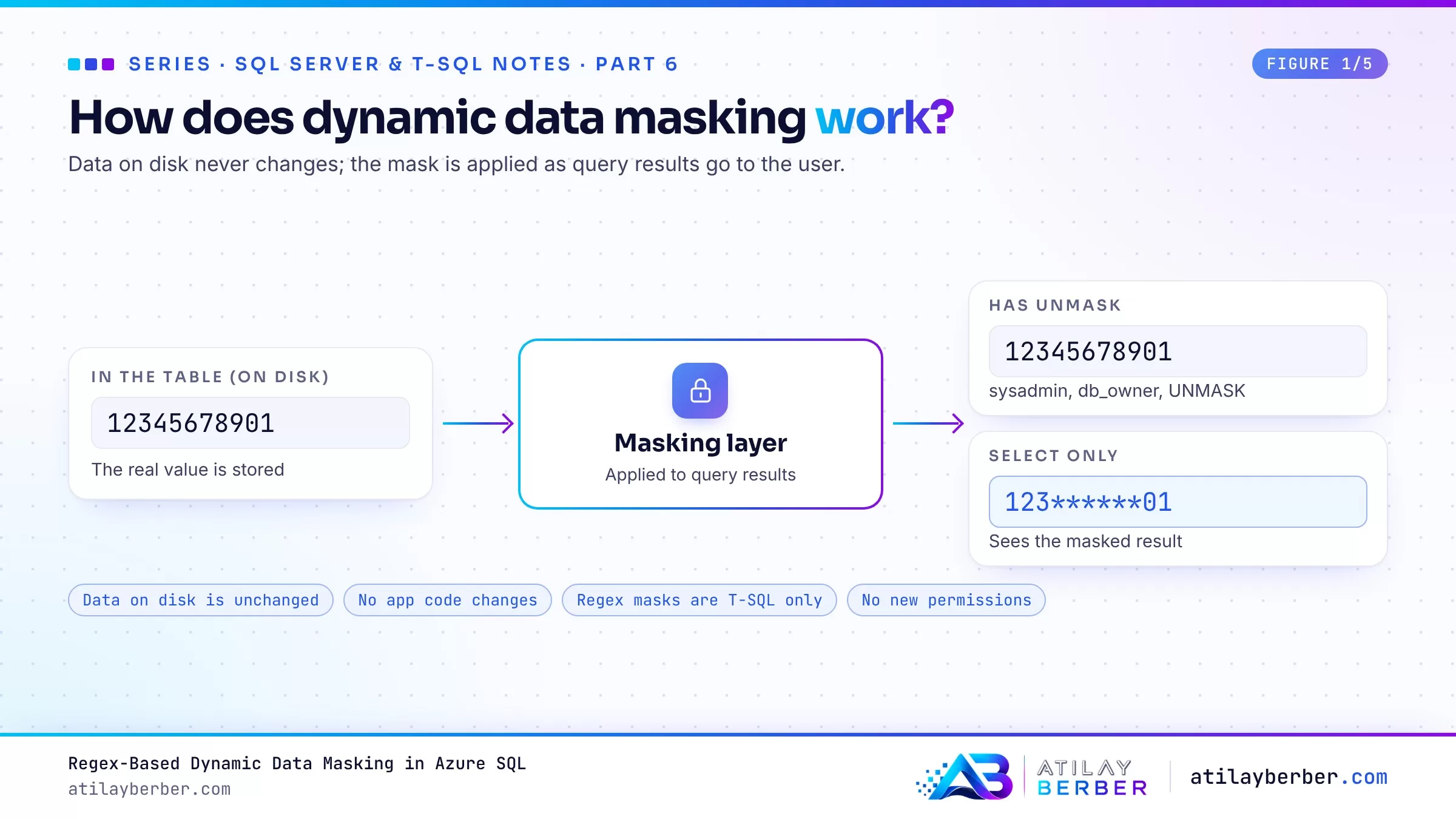
DDM doesn’t change data on disk. Query results are masked before they reach a user who lacks permission. The built-in functions are:
| Function | What it does |
|---|---|
default() | Full mask by data type (xxxx for strings, 0 for numbers) |
email() | Shows the first letter and a .com suffix: [email protected] |
random(start, end) | Replaces a number with a random value in the range |
partial(prefix, padding, suffix) | Shows a set number of characters at each end |
datetime("Y") | Masks part of a date (SQL Server 2022 and later) |
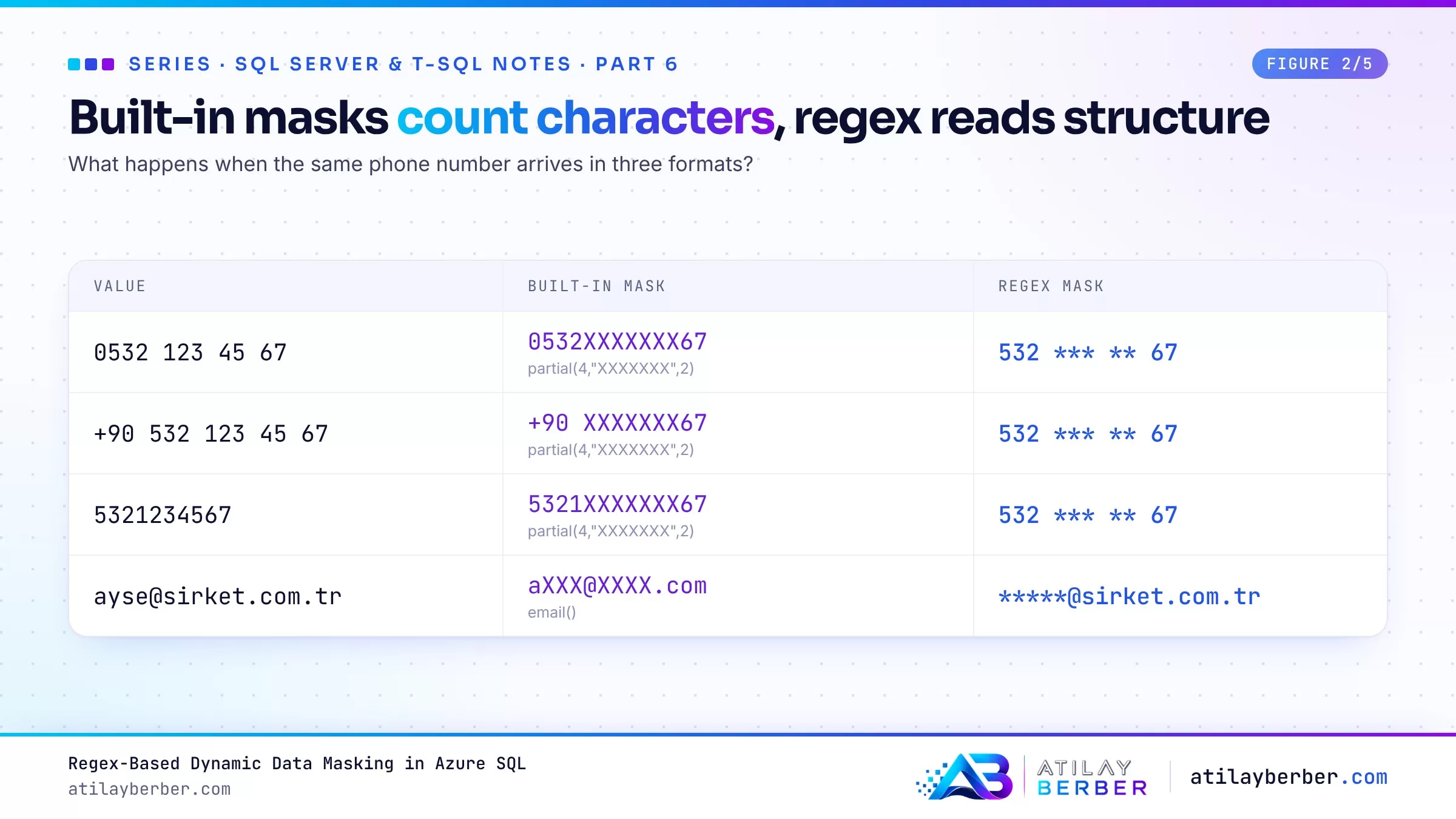
They all struggle with variable-length, structured text. email() pretends every address ends in .com; partial() counts characters and ignores structure. +44 7700 900123 and 07700900123 are the same number, but to partial() they’re two strings of different lengths.
What’s new: the REGEXP_REPLACE mask
The regex mask is the masking version of T-SQL’s REGEXP_REPLACE. You can use it in two ways:
-- When creating a table
column_name <data_type> MASKED WITH (FUNCTION = 'REGEXP_REPLACE("<pattern>", "<replacement>")')

-- On an existing column
ALTER TABLE <schema>.<table>
ALTER COLUMN <column>
ADD MASKED WITH (FUNCTION = 'REGEXP_REPLACE("<pattern>", "<replacement>")');
The details from Microsoft Learn:
- The pattern can be up to 8,000 bytes. Capture groups are referenced as
\1,\2in the replacement. - The
start,occurrenceandflagsarguments of the regularREGEXP_REPLACEcan’t be set in a mask. They’re fixed atstart = 1,occurrence = 0(replace every match) andflags = 'c'(case-sensitive). - Supported types:
char,nchar,varchar,nvarchar, plusvarchar(max)/nvarchar(max)up to 2 MB. - No new permissions.
sysadmin,db_ownerand users with explicitUNMASKsee the real data. - Regex masks are T-SQL only; the DDM page in the Azure portal doesn’t support them in this release.
The Learn example keeps the country code of a phone number and the domain of an email:
CREATE TABLE Data.CustomerDetails (
    ID INT IDENTITY(1,1) PRIMARY KEY,
    Name varchar(30),
    Phone_Number varchar(30)
        MASKED WITH (FUNCTION = 'REGEXP_REPLACE("(\+\d{1,3})(?:[ -.]?\d){7,14}", "(\1)-xxxx")'),
    Email varchar(255)
        MASKED WITH (FUNCTION = 'REGEXP_REPLACE("([a-zA-Z0-9._%+-]+)(@+)([a-zA-Z0-9.-]+)(\.)(\w)", "*****\2\3\4\5")')
);
-- +1 202-555-0123           → (+1)-xxxx
-- [email protected] → *****@example.com
One small note: [ -.] in the phone pattern isn’t “space, hyphen or dot”. It’s a range from space to dot, which also includes characters like !, #, ( and +. When you adapt it, putting the hyphen last ([ .-]) is safer.
Three sample masks
I work in Türkiye, so the examples use Turkish formats (11-digit national ID, TR IBAN, +90 mobile numbers). The idea carries over to any country: describe the structure, keep the parts people need, hide the rest. The outputs below show the pattern logic; test against your own data in Azure SQL before production.
1. National ID number
Show the first three and last two digits:
ALTER TABLE Customer.Person
ALTER COLUMN NationalId
ADD MASKED WITH (FUNCTION = 'REGEXP_REPLACE("^(\d{3})\d{6}(\d{2})$", "\1******\2")');
-- 12345678901 → 123******01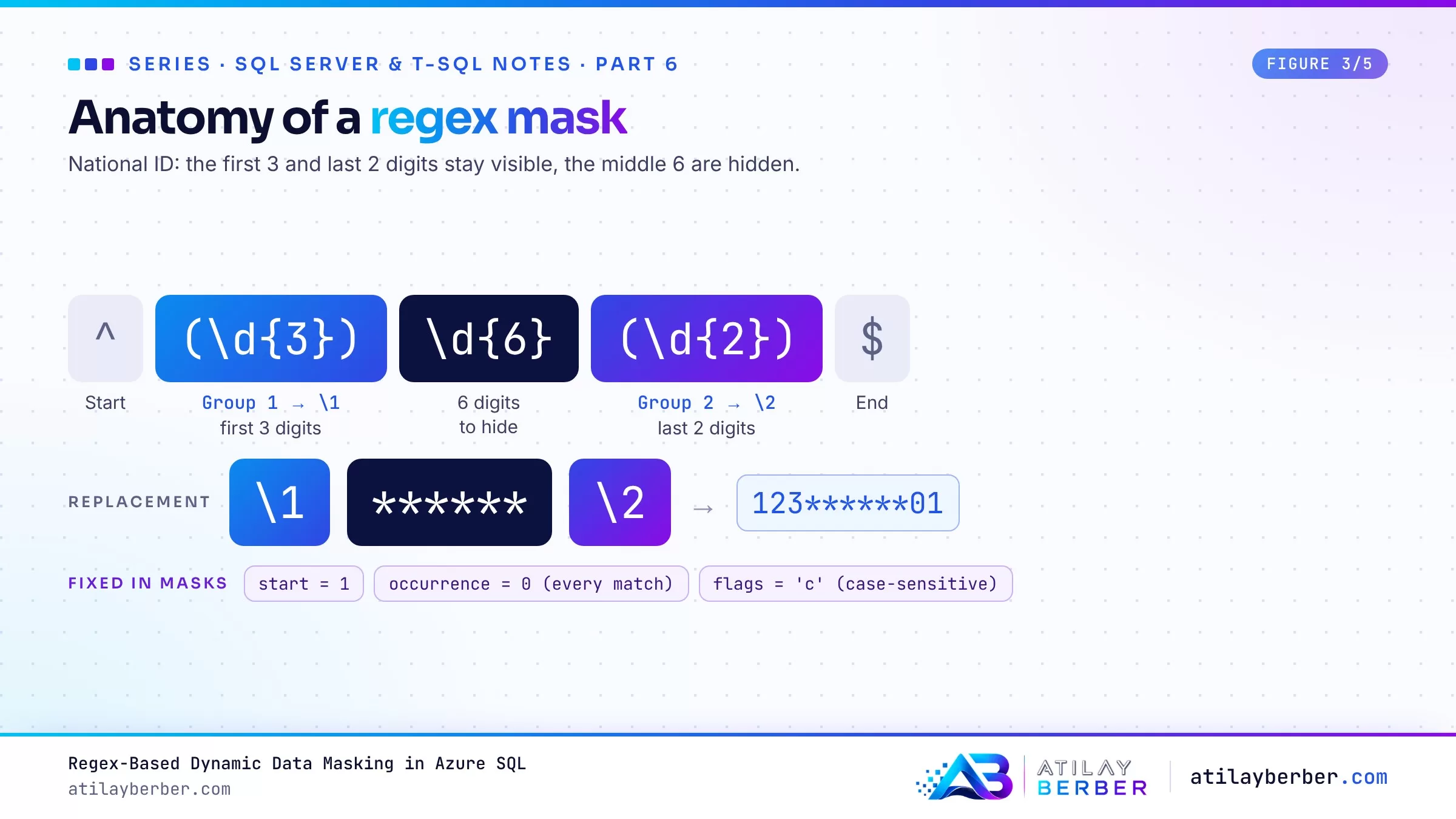
2. IBAN
Keep the country code, check digits and last four digits. Because flags is fixed to case-sensitive, I write TR as [Tt][Rr]; otherwise an IBAN typed in lowercase won’t match.
ALTER TABLE Customer.Account
ALTER COLUMN IBAN
ADD MASKED WITH (FUNCTION = 'REGEXP_REPLACE("^([Tt][Rr]\d{2})\d{18}(\d{4})$", "\1 **** **** \2")');
-- TR330006100519786457841326 → TR33 **** **** 1326
3. Mobile phone
Handles +90, 0 or no prefix, with spaces or hyphens, and keeps the operator code and last two digits:
ALTER TABLE Customer.Person
ALTER COLUMN MobilePhone
ADD MASKED WITH (FUNCTION = 'REGEXP_REPLACE("^(?:\+90|0)?\s?(5\d{2})[\s-]?\d{3}[\s-]?\d{2}[\s-]?(\d{2})$", "\1 *** ** \2")');
-- 0532 123 45 67     → 532 *** ** 67
-- +90 532 123 45 67  → 532 *** ** 67
-- 5321234567         → 532 *** ** 67
The big trap: values that don’t match stay visible
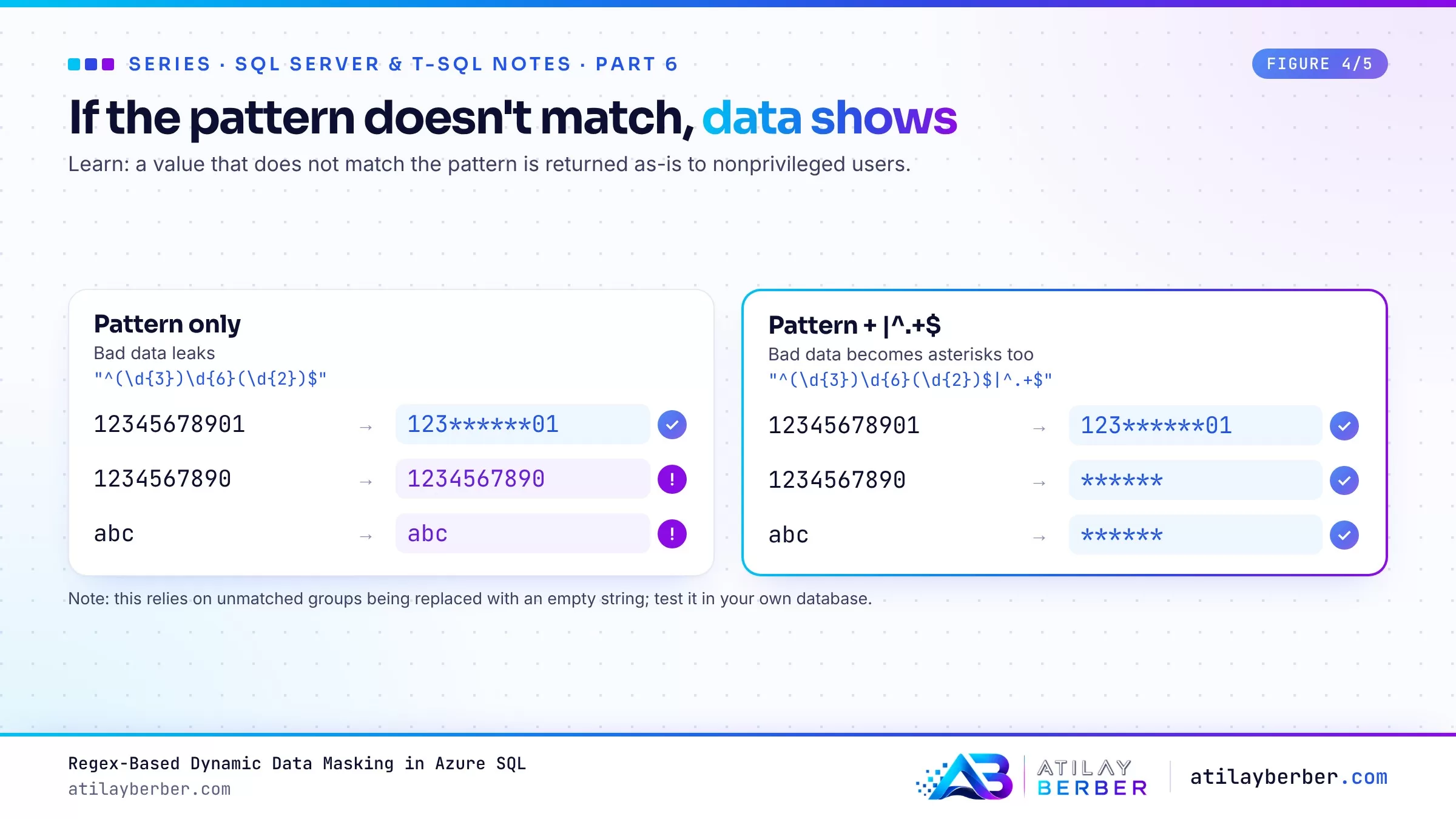
Learn says it plainly: a value that doesn’t match the pattern is returned as-is to nonprivileged users. For the examples above:
| Value | Result |
|---|---|
TR33 0006 1005 1978 6457 8413 26 (IBAN with spaces) | Not masked, fully visible |
(0532) 123 45 67 (phone with parentheses) | Not masked, fully visible |
1234567890 (10 digits, invalid ID) | Not masked, fully visible |
So a regex mask is only as good as your data. On a messy column, “we masked it” really means “we masked the clean rows”.
Two ways to deal with it:
1. Standardize the data first. Store IBANs without spaces and phone numbers in one format. Regex helps here too; REGEXP_LIKE finds the rows that don’t fit:
SELECT ID, IBAN
FROM Customer.Account
WHERE NOT REGEXP_LIKE(IBAN, '^[Tt][Rr]\d{24}$');
Note: REGEXP_LIKE requires database compatibility level 170 or higher. I covered this in my T-SQL RegEx post.
2. Write the pattern to fail closed. Add a second alternative, |^.+$. If the first alternative matches, its groups are shown; if it doesn’t, the second one captures the whole value, the groups are empty and the result is just asterisks:
ALTER TABLE Customer.Person
ALTER COLUMN NationalId
ADD MASKED WITH (FUNCTION = 'REGEXP_REPLACE("^(\d{3})\d{6}(\d{2})$|^.+$", "\1******\2")');
-- 12345678901 → 123******01
-- 1234567890  → ******
-- abc         → ******
This relies on unmatched groups being replaced with an empty string. Learn doesn’t document that behavior specifically for masks, so try it with a few bad values in your own database before you rely on it.
Permissions and checks
The Learn approach works well for testing as a nonprivileged user:
CREATE USER MaskTest WITHOUT LOGIN;
GRANT SELECT ON Customer.Person TO MaskTest;

EXECUTE AS USER = 'MaskTest';
SELECT TOP (5) NationalId, MobilePhone FROM Customer.Person;   -- masked
REVERT;

-- Unmask a single column if needed
GRANT UNMASK ON Customer.Person(MobilePhone) TO MaskTest;
To see which columns carry which mask:
SELECT t.name AS table_name, c.name AS column_name, c.masking_function
FROM sys.masked_columns AS c
JOIN sys.tables AS t ON c.[object_id] = t.[object_id]
WHERE c.is_masked = 1;
Adding, changing or removing a mask needs ALTER ANY MASK plus ALTER on the table. Microsoft suggests giving that permission to a security officer.
Things to watch
- Status: The Azure Updates entry (AZ578471) lists the feature as GA for Azure SQL Database. While I was writing this, some copies of the Learn article still carried a preview note; check both until the page is updated.
- Scope: The announcement covers Azure SQL Database only. Regex masks aren’t mentioned for Azure SQL Managed Instance, SQL Server 2025 or SQL database in Fabric.
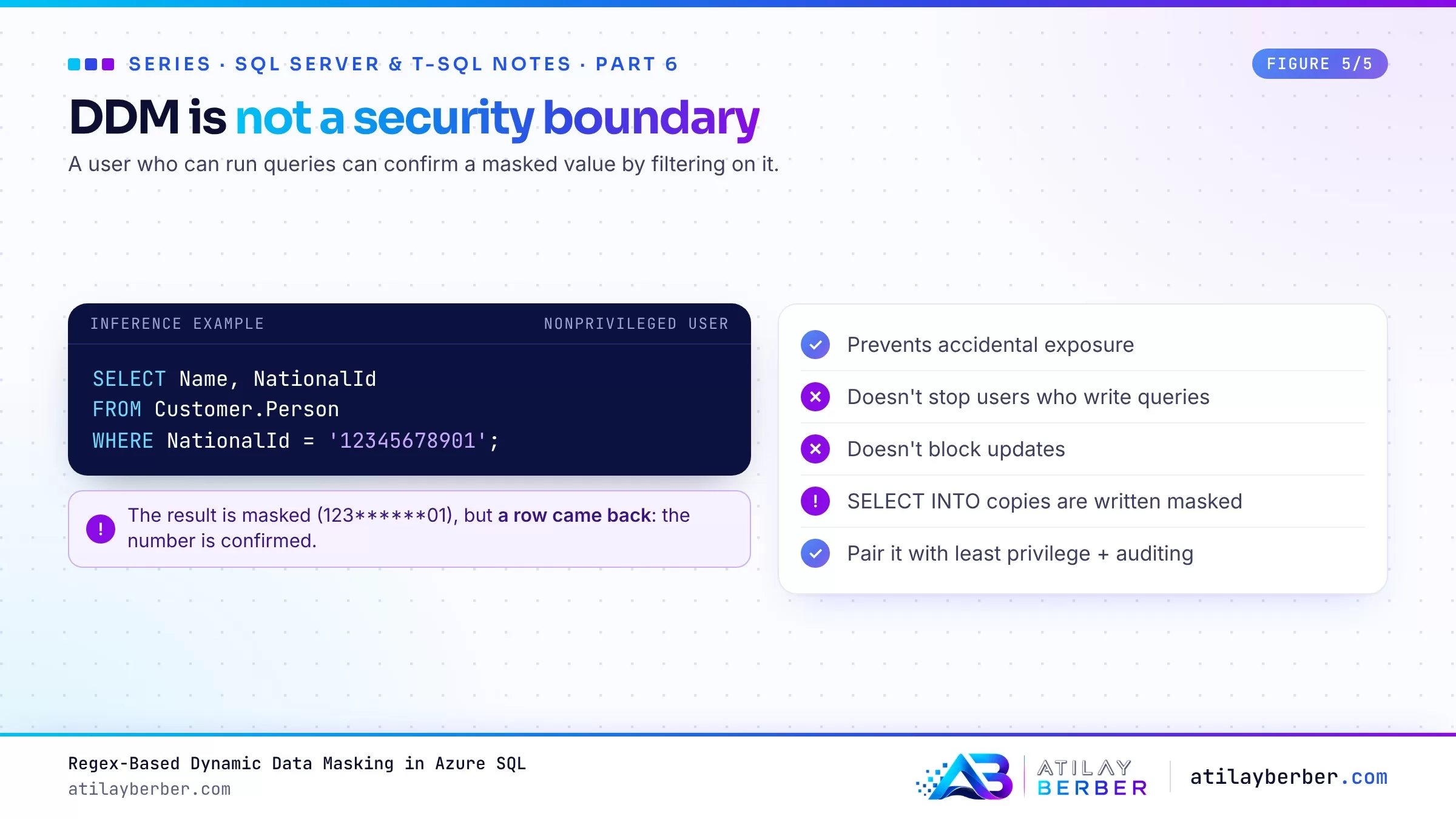
- DDM isn’t a security boundary. Microsoft’s own note: a user who can run ad hoc queries can infer masked values by filtering with
WHERE. Use DDM to prevent accidental exposure, together with least privilege and auditing. - Copies stay masked. If a user without
UNMASKmoves data withSELECT INTOorINSERT INTO, masked values land in the target table. Exports behave the same way. - Masks don’t block updates. A user with write access can still change a masked column.
- Columns you can’t mask: Always Encrypted columns, FILESTREAM, computed columns (though they return masked data if they depend on a masked column), FULLTEXT key columns and PolyBase external tables.
- Dependencies: Adding a mask to a column with an index or computed column depending on it fails; drop the dependency, add the mask, then recreate it.
- Regulation: Masking alone doesn’t satisfy GDPR or similar laws. It’s one layer next to access control, encryption and logging.
When should you use it?
The sweet spot is anywhere data must be partly visible: support screens, read-only users behind Power BI reports, developers looking at a copy of production. You define the masking logic once in the database instead of in every application, which pays off fast when several apps read the same table.
Order matters, though: measure the format with REGEXP_LIKE first, then write the mask, then test as a nonprivileged user. A regex mask on an uncleaned column is a control that looks reassuring and still leaves gaps.
I covered the basics of regex in T-SQL in my RegEx post, and the next data-quality step, deduplication, in my fuzzy matching post.
Where do you hide personal data today: in the app, in the report, or in the database? Let me know in the comments or on LinkedIn.
Sources
- Generally Available: Azure SQL updates for mid-November 2026 (Azure Updates, AZ578471)
- Regex-based dynamic data masking in Azure SQL Database — Microsoft Learn
- Dynamic data masking (SQL Server) — Microsoft Learn
- Dynamic data masking (Azure SQL) — Microsoft Learn
- What’s new across Microsoft SQL at Microsoft Ignite 2026 — Azure SQL Dev Corner